🔄

Construction Punch List Software

Track Every Punch List Item in One Place

SafetyIQ's construction punch list software gives your team one place to track every outstanding item — from assignment to sign-off. Set due dates, monitor progress in real time, and close out projects faster, without chasing spreadsheets or paper lists.

Book My Free Demo

Trusted by Leading EHS Teams

Close Out Punch Lists Faster

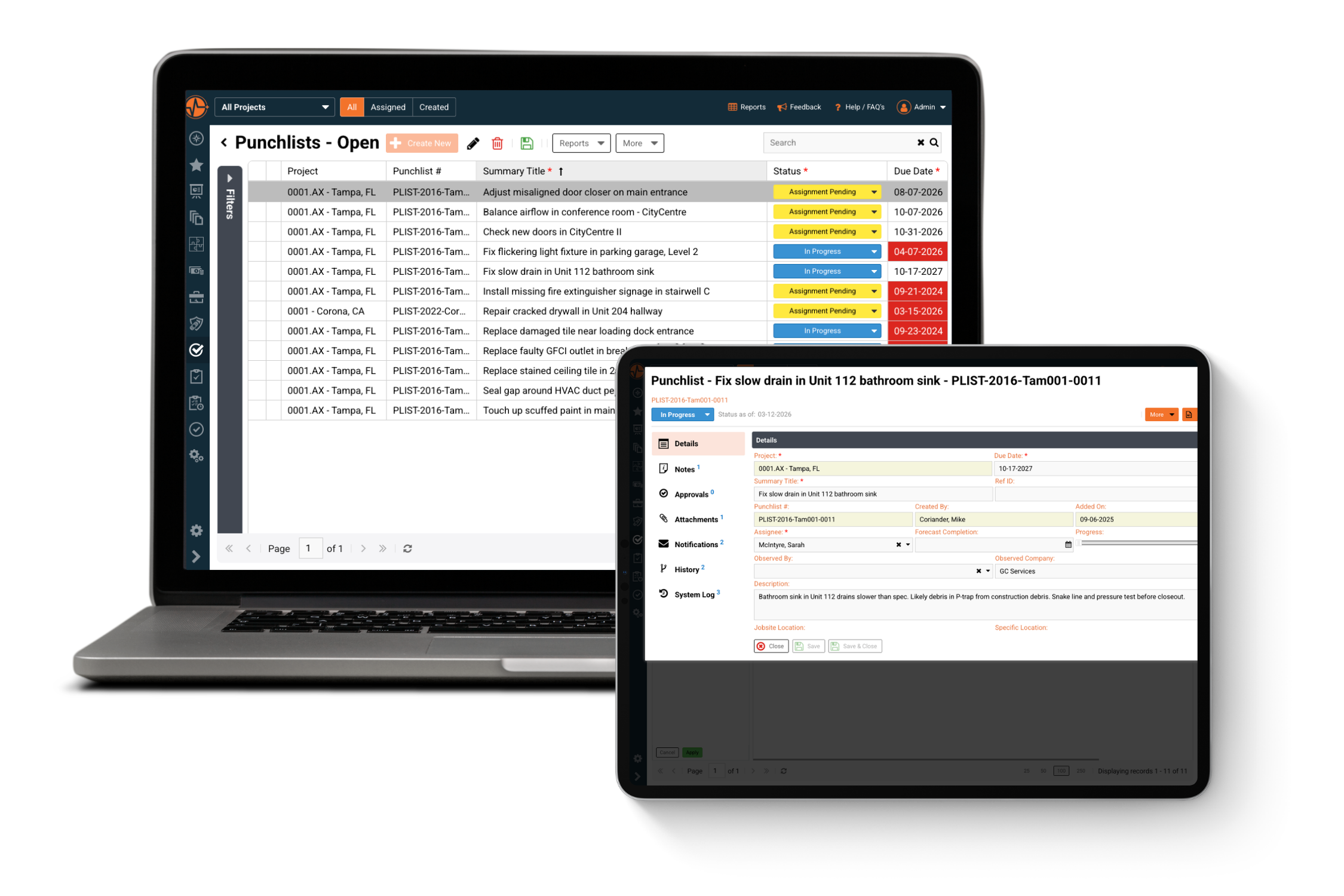
  • Auto-Generated Tracking: No more manually numbering or filing items. Every punch list entry is created and tracked automatically, so nothing slips through the cracks.
  • Real-Time Progress Insights: See exactly how close each item is to completion at a glance, so you can prioritize what's falling behind before it delays the project.
  • Centralized Assignee Accountability: Every item is tied to a specific person, so there's no ambiguity about who's responsible, and no chasing people down to find out.
Book My Free Demo

Keep Every Stakeholder in the Loop

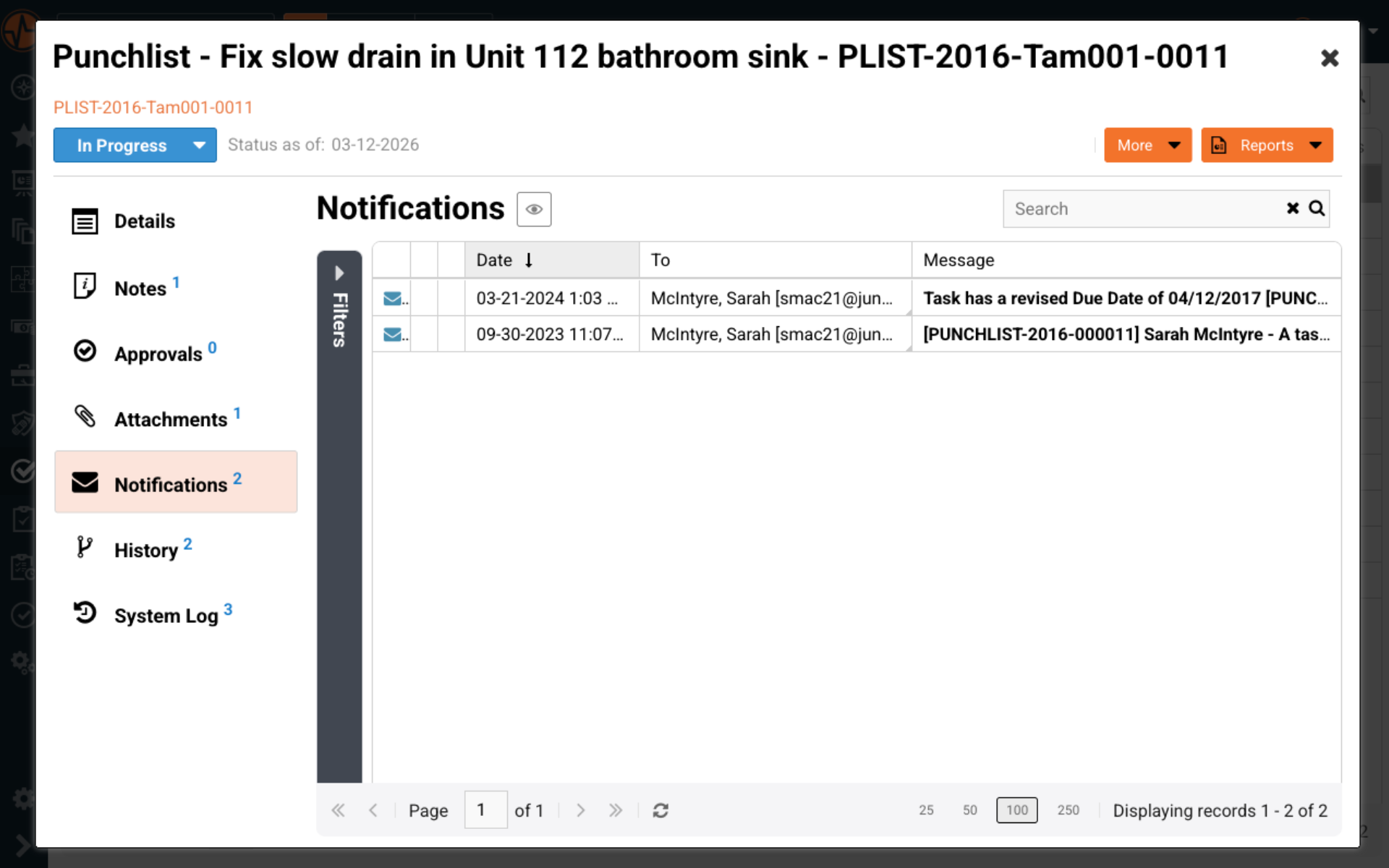
  • Built-In Notifications: Assignees and observers are automatically alerted when items are created, updated, or due — cutting down on missed deadlines from lack of visibility.
  • Full History & System Log: Every change is time-stamped and recorded, giving you a clear audit trail for disputes, inspections, or closeout documentation.
  • Attachments & Approvals in One Place: Photos, notes, and sign-offs live directly on the item — no digging through email threads or separate folders to find supporting documentation.
Book My Free Demo

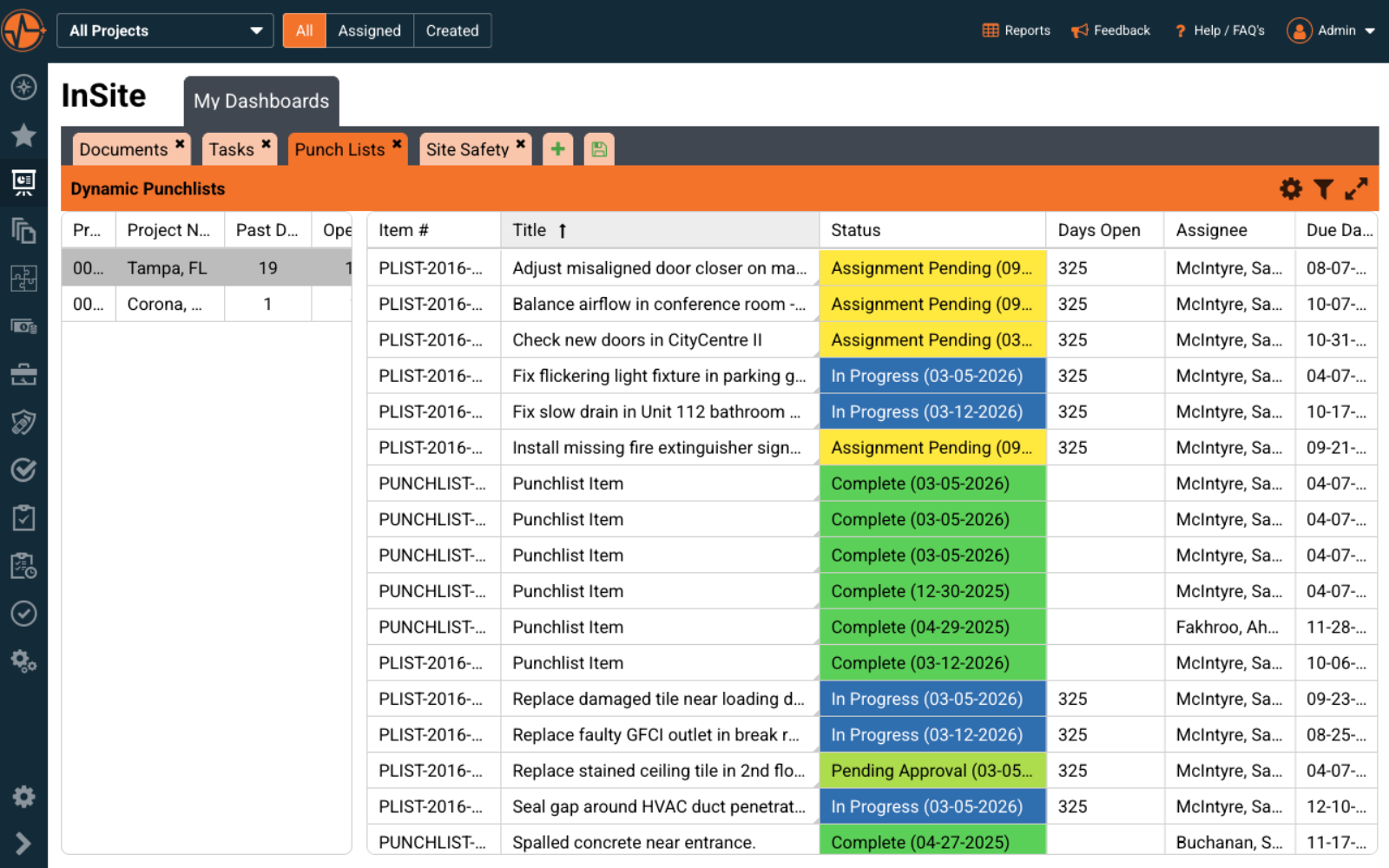
One Dashboard, Every Project's Punch List

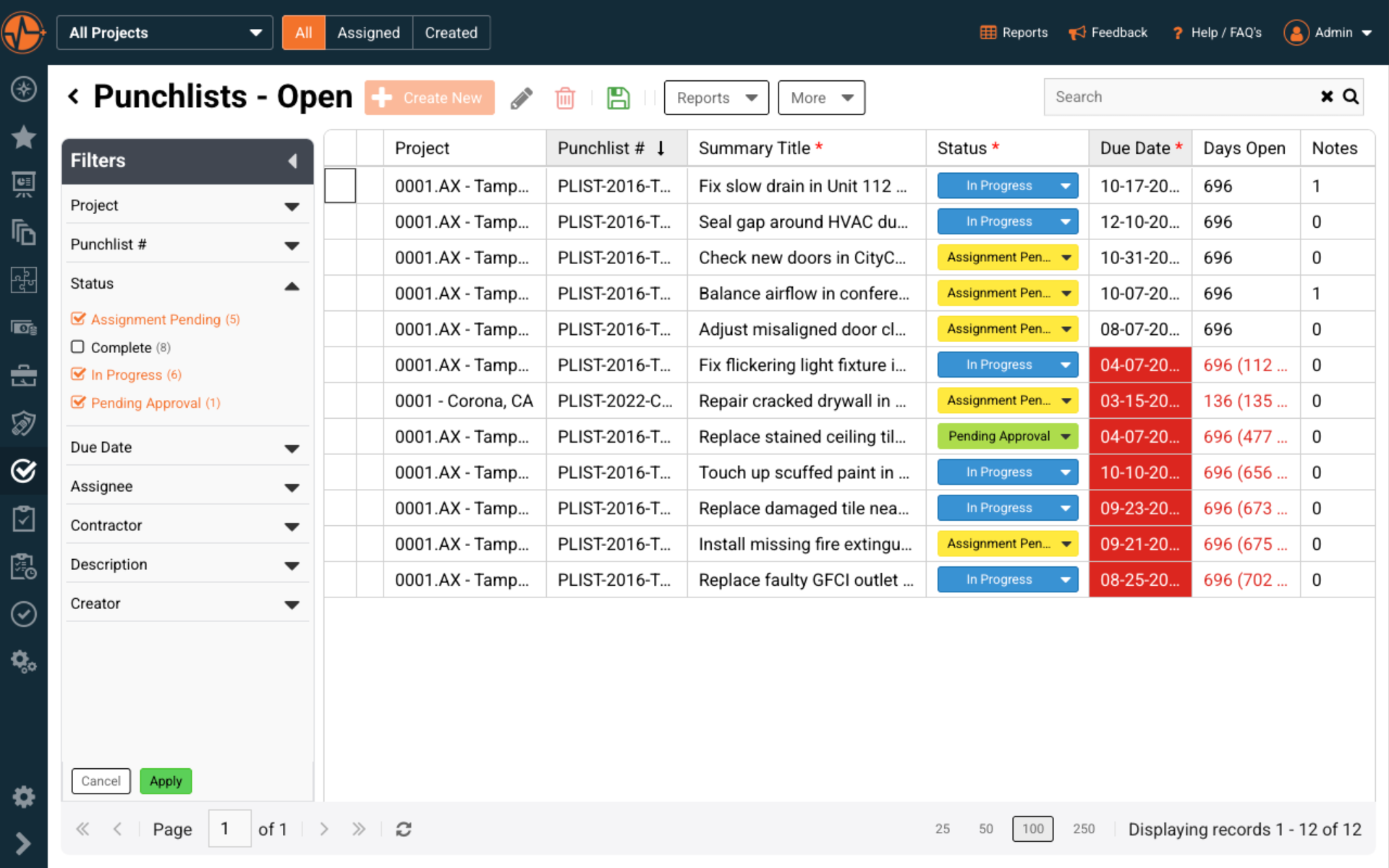
  • Cross-Project Visibility: See every punch list item across every active project in a single view, so nothing gets buried in project-specific spreadsheets or siloed tools.
  • Status at a Glance: Color-coded statuses — Assignment Pending, In Progress, Pending Approval, Complete — let supervisors instantly spot what needs attention without opening every item individually.
  • Days Open Tracking: Automatically track how long each item has been open, surfacing aging issues before they turn into project delays or compliance risks.
Book My Free Demo

How the SafetyIQ Platform Works

Built for teams that never stand still, SafetyIQ combines mobile-first accessibility, intuitive design, and real-time intelligence into one connected safety ecosystem. Whether you’re in the field, the office, or offline, our platform keeps your operations moving and your people protected.

Work Anywhere. Stay Compliant Everywhere.

Safety doesn’t stop when Wi-Fi does. SafetyIQ’s offline capabilities ensure field teams can capture audits, incidents, and inspections anytime, syncing automatically once reconnected — so no moment of insight is ever lost.

  • Full offline functionality for remote sites and travel
  • Automatic data sync once connectivity is restored
  • Empower field teams to report, track, and act in real time
Two workers in safety gear and helmets discussing work in front of stacked shipping containers, with one pointing ahead and holding a tablet.

Intuitive by Design — Powerful by Purpose

SafetyIQ is made for everyday use, not once-a-month check-ins. The platform’s modern interface and guided workflows help anyone — from operators to executives — take action confidently, without training overload or tech frustration.

  • Mobile-first design built for tablets and smartphones
  • Fast, clean interface optimized for quick data entry
  • Role-based dashboards that highlight what matters most
Female engineer in safety helmet and glasses using a digital tablet in an industrial warehouse.

Unite Safety and Operations Under One System

When safety data lives in silos, teams act slower. SafetyIQ connects field staff, supervisors, and leadership in real time — ensuring everyone has the same information and the same goal: a safer, more efficient operation.

  • Orange check mark icon.
    Shared visibility across teams and sites
  • Orange check mark icon.
    Instant alerts and updates for corrective actions
  • Orange check mark icon.
    One source of truth for safety communication
Three workers wearing safety helmets and vests walking and talking in front of stacked shipping containers at a port.

Achieve Compliance and Visibility Across Every Site

Most safety systems slow teams down. SafetyIQ was built to move with them — fast, flexible, and field-tested.
Whether online or offline, our software keeps operations running and decisions data-driven.

See What’s Happening Before It Becomes a Problem

Bring all your safety activity into focus. From audits and incidents to corrective actions, you’ll have instant visibility into what’s working, what’s not, and what needs your attention.

  • Track every safety process in real time
  • Eliminate blind spots with unified data and reporting
  • Make decisions faster with clarity across your operations

Put Safety in Everyone’s Hands

Your people are the heart of every safety program. SafetyIQ helps them take ownership — reporting issues, completing checklists, and accessing training right from the field. When safety is simple, engagement follows.

  • Simplify training, inspections, and feedback loops
  • Enable mobile access for workers anywhere, even offline
  • Turn awareness into action across every level of your team

Unite Every Location, Team, and Task

Connect field and office teams through one shared system. Whether you manage a single site or dozens, everyone works from the same data — keeping communication clear and performance consistent.

  • Standardize how safety work gets done across sites
  • Sync updates and tasks automatically between teams
  • Ensure alignment between operations, leadership, and compliance

Know What’s Next — Not Just What Happened

See patterns before they turn into incidents. By combining data from audits, observations, and reports, you can predict risk and act early — turning hindsight into foresight.

  • Detect trends across incidents and behaviors
  • Identify root causes faster with real-time analytics
  • Predict and prevent recurring issues with smarter insights

Build a Safety Culture That Keeps Getting Better

Turn everyday activity into measurable progress. Use data, automation, and feedback to refine your programs, strengthen accountability, and make safety part of how your organization grows.

  • Measure performance and improvement over time
  • Automate routine follow-ups and recurring tasks
  • Empower teams to take initiative through visible results

Connect Every Part of Your EHS Program

Pair SafetyIQ modules to create a unified safety ecosystem—enhancing visibility, compliance, and worker protection.

Audits & Inspections

Simplify safety audits and inspections with custom checklists, automated follow-ups, and real-time reporting to maintain compliance year-round.

Learn more

Alertness Tracking

Measure worker readiness in seconds with engaging, game-based tests, helping you identify and prevent fatigue-related risks before shifts even begin.

Learn more

Document Control

Centralize, control, and distribute critical EHS documents with version tracking and permissions that keep teams aligned and audit-ready.

Learn more

Equipment Inspections

Schedule, complete, close, and manage asset and equipment inspections in the field — with every finding tracked and every record visible.

Learn more

Fatigue Management

Track fatigue levels, identify high-risk employee patterns, and make sure the right people are always fit and ready to work, before fatigue becomes a risk.

Learn more

Incident Management

Improve how incidents are documented, reviewed, and closed with tools that strengthen accountability and long-term safety outcomes.

Learn more

Journey Management

Monitor and manage worker travel with real-time visibility, check-ins, and configurable escalation paths that keep mobile teams safe on every trip.

Learn more

Management of Change

Assess, approve and track every change before it introduces new risk, giving your team full visibility from the first request through to final close-out.

Learn more

PPE Management

Track, assign, and manage personal protective equipment across your workforce — so the right gear reaches the right people, every time.

Learn more

Risk Management

Identify, assess, and control risks with structured tools that streamline hazard reviews, track mitigation actions, and support continuous improvement.

Learn more

Safety Data Sheets

Centralize every hazardous chemical document across your sites, so your team always has the right safety data sheet on hand, current, and compliant.

Learn more

Safety Observations

Encourage proactive reporting with digital safety work observations that help identify unsafe behaviors and improve safety culture company-wide.

Learn more

Training Tracking

Track, assign, and verify employee training with automated reminders and clear competency records that help teams stay compliant and ready.

Learn more

Customer Reviews of SafetyIQ

Real EHS teams improving their safety cultures with SafetyIQ. Discover how safety, risk and compliance leaders are using our platform to unify their programs, build proactive safety engagement, and drive measurable cultural change across their organizations.

Tony A.
Safety Coordinator
"Easy Injury & Audit Entries That Make Recognition Simple"
5/5
Brooks K.
Director of Safety
"Very Useful EHS Software"
5/5
Stuart B.
Principal
"Practical, Operations-Focused SafetyIQ That Turns Data Into Proactive Risk Visibility"
4.5
Verified User in Oil & Energy
SafetyIQ User
"SafetyIQ Makes Offshore Safety Reporting Fast, Mobile, and Proactive"
5/5
Verified User in Consulting
SafetyIQ User
"Simplified EHS Operations, Easy Customization"
5/5
Verified User in Mining & Metals
SafetyIQ User
"Great Value and Easy to Use HSE and Training Package"
4.5
Shelby C.
EHS Manager
"Hands Down the Go-To for User Friendly, Affordable & Customizable EHS Software"
5/5
Ami M.
Construction Manager
"SafetyIQ Has Changed Our Approach to Employee Safety"
5/5

Construction Punch List Resources

Construction Punch List Software FAQs

What Is Construction Punch List Software?

+

Construction punch list software is a digital tool that replaces paper checklists and spreadsheets for tracking outstanding items that need to be completed before a construction project is officially closed out. Instead of manually compiling lists after a walkthrough and emailing them to subcontractors, punch list software lets teams create, assign, and track every item — from minor touch-ups like scuffed paint to more significant issues like faulty electrical outlets — in one centralized system. Each item typically includes details like the responsible trade, due date, location, photos, and current status, giving project managers real-time visibility into what's outstanding across every active job site. This reduces the back-and-forth of tracking down subcontractors, prevents items from being forgotten, and creates a documented record that's useful for both project closeout and future disputes or warranty claims.

How Does Punch List Software Improve Project Closeout Timelines?

+

Traditional punch list processes often rely on paper walkthroughs, spreadsheets, or scattered email threads, which makes it easy for items to get lost, duplicated, or forgotten entirely — especially on larger projects with dozens or hundreds of outstanding items across multiple trades. Punch list software solves this by automatically tracking due dates, assignee accountability, and progress percentages for every item in real time. Supervisors can see at a glance which items are overdue, which are in progress, and which are pending approval, without needing to manually follow up with each subcontractor. Automated notifications also alert assignees when new items are created or deadlines are approaching, which cuts down on the delays caused by miscommunication. Because everything lives in one system rather than being split across emails, text messages, and paper forms, teams typically close out projects faster and with fewer items slipping through the cracks.

Can Punch List Software Be Used Across Multiple Projects at Once?

+

Yes — most modern punch list software, including SafetyIQ's platform, is built specifically to give teams visibility across multiple active projects simultaneously, not just one job site at a time. Rather than maintaining separate spreadsheets or paper lists for each project, supervisors and project managers can view a single dashboard that aggregates punch list items from every project they're responsible for. This is especially valuable for general contractors, developers, or safety managers overseeing several sites at once, since it allows them to quickly identify which projects have the most outstanding items, which trades are falling behind on completion, and where attention needs to be prioritized. Filtering and sorting capabilities — by project, status, assignee, or due date — make it possible to drill down into a specific site's punch list or step back and see the bigger picture across an entire portfolio of active construction projects.

What Information Should Be Included in a Punch List Item?

+

A well-documented punch list item should include enough detail that the assigned trade or subcontractor can address the issue without needing additional clarification, and enough documentation that the item can be verified as resolved later. At minimum, this typically includes a summary title describing the issue, a specific location (both the general jobsite area and a more precise location, like a unit number or wall), the trade or individual responsible for fixing it, a due date, and a detailed description of the problem — including any relevant measurements, materials, or suspected causes. Photos are also strongly recommended, since they provide visual documentation of the issue's condition both before and after the fix, which is valuable for quality control and for resolving any disputes about whether an item was actually completed correctly. Many punch list software platforms also track a progress percentage and forecast completion date, which helps project managers gauge how close an item is to resolution even before it's marked complete.

Is Punch List Software Useful for Safety, Compliance and Audit Purposes?

+

Yes. One of the often-overlooked benefits of digital punch list software is the audit trail it creates automatically. Every time an item is created, updated, reassigned, or marked complete, the system logs a timestamp and the user who made the change, building a detailed history that would be extremely difficult to reconstruct from paper records or scattered emails. This is valuable in several scenarios: during regulatory inspections where a project needs to demonstrate that safety-related or code-required items were properly addressed, during warranty disputes where a contractor needs to prove an item was resolved within an agreed timeframe, and during internal audits where a company wants to evaluate how efficiently its teams are closing out punch list items across projects. Because SafetyIQ connects punch list tracking with its broader EHS management system — including audits, incident reporting, and corrective actions — safety and compliance teams can pull a complete, cross-referenced record of an issue's full lifecycle, from the moment it was first identified to its final resolution, without needing to piece it together from multiple disconnected tools.

See how SafetyIQ helps simplify EHS management and builds a stronger safety culture.

Get Your Demo