
Every safety data sheet, current and in reach
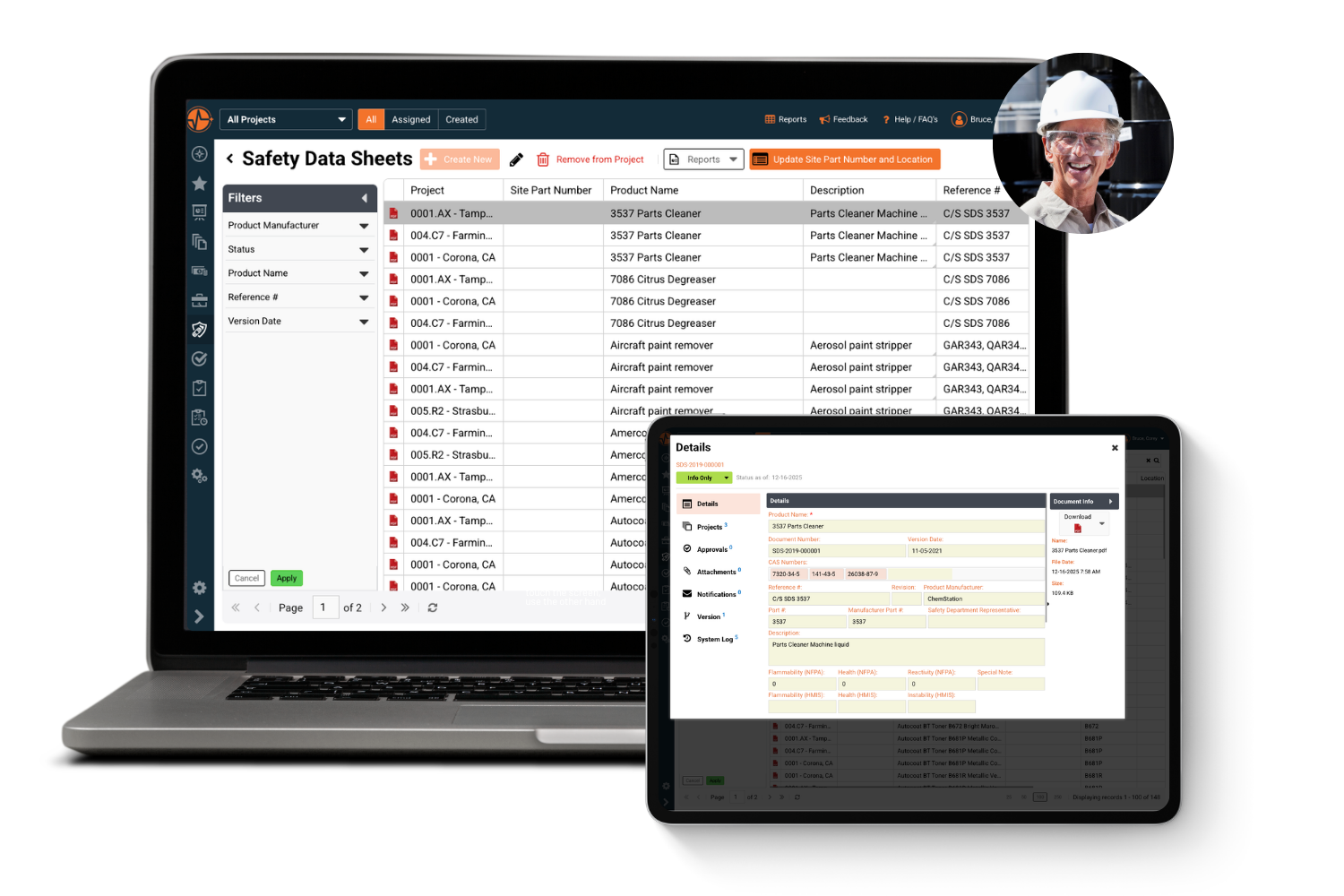
Store, version and share every SDS across your sites and projects in one searchable library, with the full manufacturer PDF on any phone, even offline.
Request a demo


Trusted by Leading EHS Teams










> Why SafetyIQ
Stop hunting for safety data sheets when seconds count
Binders go missing, shared drives go stale and the sheet on the shelf rarely matches the latest revision. SafetyIQ keeps one current SDS library for every site.
01
One library, every site
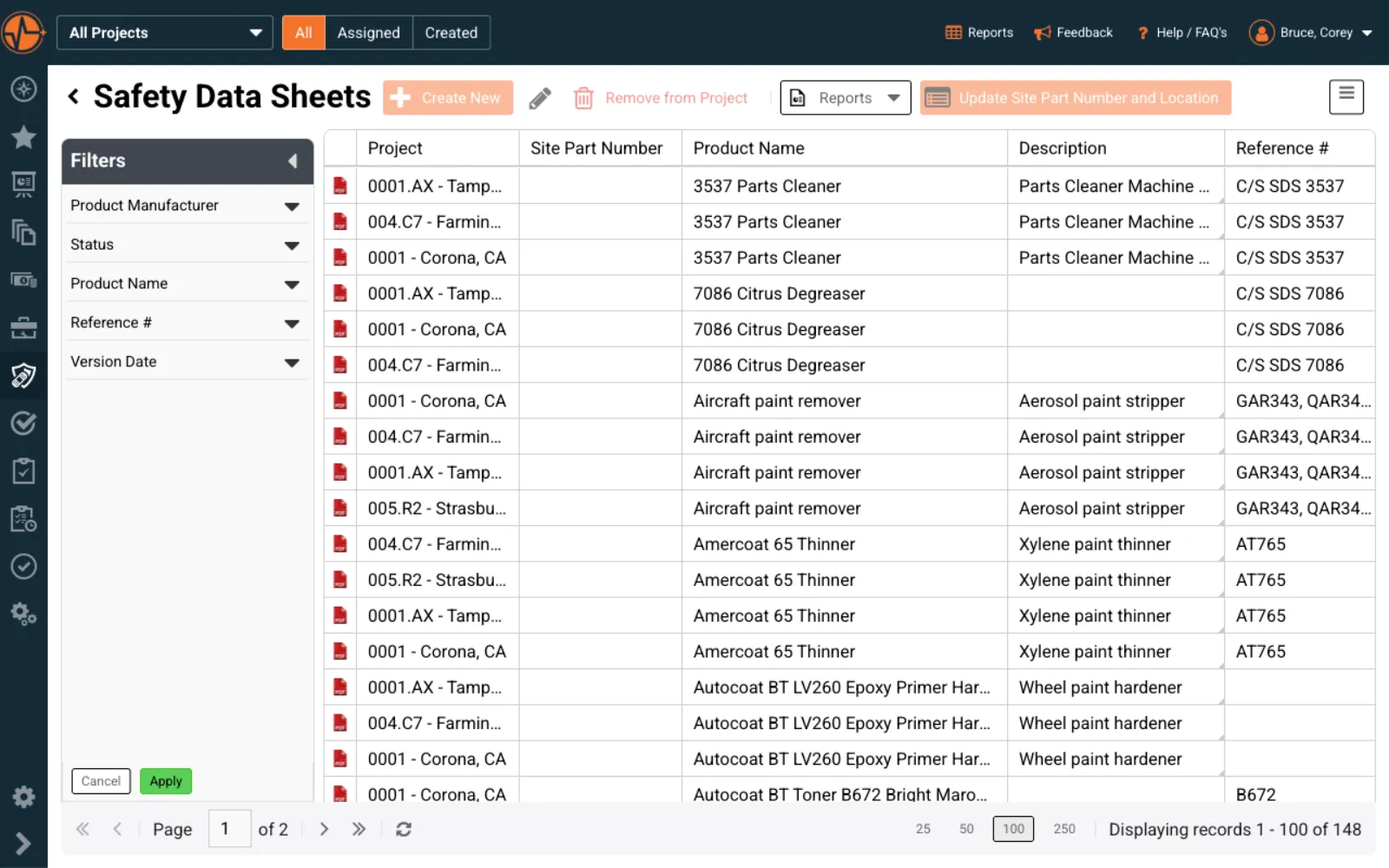
Every SDS lives in one searchable, cloud-based library, assigned to the projects and locations that use each chemical.
02
Always the current version
Document numbers and revision dates are tracked on every record, so you can upload a supplier update and keep the full history.
03
In workers' hands, even offline
Crews pull up the full manufacturer PDF on any phone or tablet, with or without a signal.
> How it works
Store, share and prove every SDS
One record per chemical, from the manufacturer's PDF to the hazard ratings your crews check before they start the job.
01 · Store
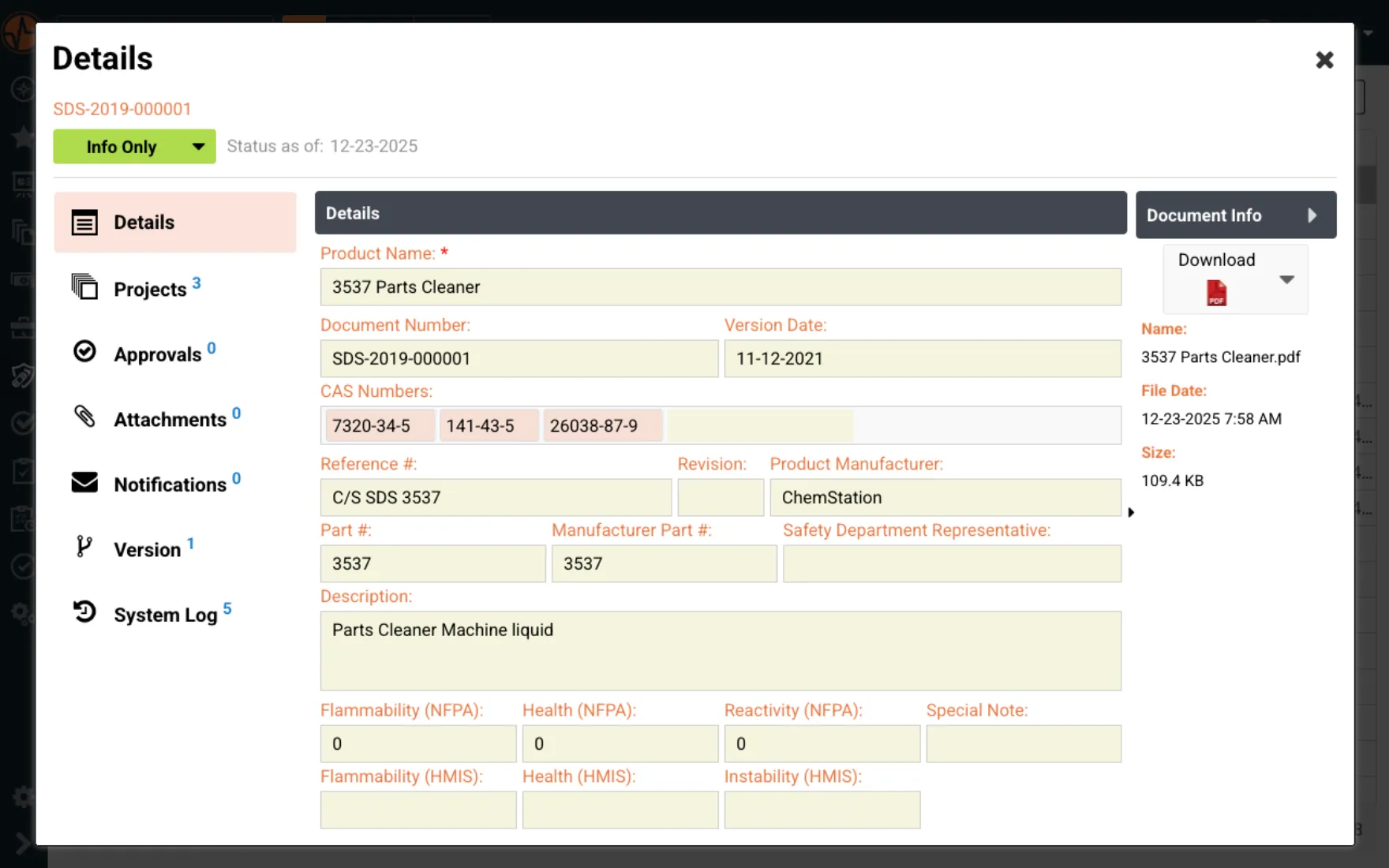
Every chemical detail in one structured record
Capture CAS numbers, manufacturer details and NFPA and HMIS flammability, health and reactivity ratings alongside the full SDS.
- ✓CAS numbers and manufacturer details on every record
- ✓NFPA and HMIS hazard ratings at a glance
- ✓Multiple files attached to one chemical entry
02 · Share
Put the right sheet in front of the right crew
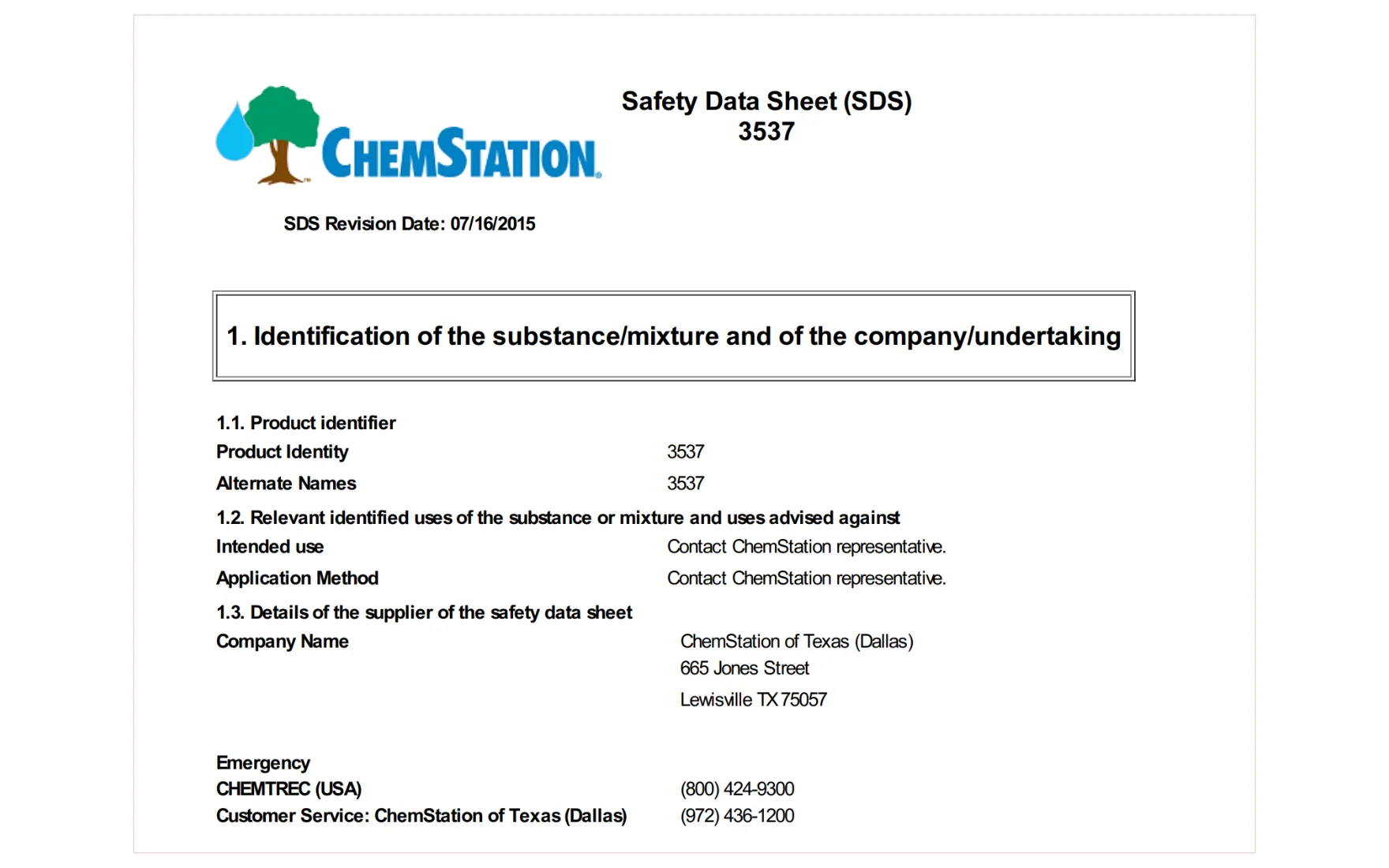
Assign SDS records to specific projects and sites, so each location sees the chemicals it actually uses, on mobile, online or offline.
- ✓Project and site assignment for every SDS
- ✓Mobile access with offline availability
- ✓Full manufacturer PDF, no separate logins
03 · Prove
Audit-ready SDS records on demand
Every sheet is stored with its document number, revision date and file history, so you can show an inspector the current SDS in seconds.
- ✓Version control with full revision history
- ✓Timestamped record for every document
- ✓Spot chemicals missing a current SDS
> The difference
What changes when SDS binders go digital
Most SDS programs live in binders, shared drives and supplier emails. Here is what that looks like with and without SafetyIQ.
> Customer story
cut from workers' comp direct costs in two years
Palfinger gave its workforce one system to report hazards, log incidents and complete audits from any device, moving its aerial lift truck division from reactive to preventative safety.
Workers Comp direct cost alone has been reduced by almost one million dollars in the last two years so I would say there is plenty of evidence of what a good safety management system can do to benefit a company.
Customer Reviews of SafetyIQ
Real EHS teams improving their safety cultures with SafetyIQ. Discover how safety, risk and compliance leaders are using our platform to unify their programs, build proactive safety engagement, and drive measurable cultural change across their organizations.



> Works with
Connect SDS to the rest of your safety program
Chemical hazards touch risk, documents, training and PPE. These modules cover the rest.
Assess chemical hazards before work starts
Hazard & Risk Management
Identify hazards early and address them before they lead to safety incidents.
Control your HazCom program documents
Document Management
Organize, manage, and track every safety document to keep teams aligned.
Train workers to read and use an SDS
Training Tracking
Assign, track, and manage training so your workforce stays prepared and compliant.
Match PPE to the chemicals on site
PPE Management
Track, assign and manage personal protective equipment so the right gear reaches the right people.
> Not ready for a demo?
Brush up on SDS and GHS basics
Plain-English guides to what a safety data sheet covers, its 16 GHS sections and who has to provide and keep one.
> FAQ
Safety data sheet software FAQs
What Is a Safety Data Sheet and Why Is It Required?
A Safety Data Sheet is a standardized document that provides detailed information about a chemical product — including its hazards, safe handling procedures, storage requirements, emergency response guidance, and disposal instructions. OSHA's Hazard Communication Standard requires employers to maintain an SDS for every hazardous chemical used in the workplace and ensure workers can access them at any time during their shift. Failing to maintain a complete, current SDS library isn't just a compliance risk — it puts your workers in danger and exposes your organization to significant fines and liability. Every business that uses, handles, stores, or transports hazardous chemicals is legally obligated to have Safety Data Sheets on file and readily accessible.
How Many Safety Data Sheets Does My Organization Need to Manage?
The number varies widely depending on your industry, the size of your operation, and how many different chemical products your teams use across your sites. A small facility might manage a few dozen. A large manufacturing, construction, or industrial operation can easily have hundreds — spread across multiple locations, projects, and work crews. The challenge isn't just the volume; it's keeping every sheet current, ensuring the right version is assigned to the right site, and making sure workers can actually find what they need when they need it. Without a centralized system, that quickly becomes an unmanageable administrative burden.
What Are the OSHA Requirements for Safety Data Sheet Management?
OSHA requires that Safety Data Sheets be readily accessible to employees during their work shifts, in their work areas, and without barriers. That means no locked cabinets, no requiring a supervisor to retrieve them, and no delays. SDS documents must follow the 16-section GHS format, cover every hazardous chemical on site, and be kept up to date when manufacturers issue revisions. Employers are also required to train workers on how to read and use Safety Data Sheets as part of their Hazard Communication program. Non-compliance can result in OSHA citations, financial penalties, and — more importantly — preventable injuries or fatalities when workers don't have the hazard information they need.
What Is SDS Management Software and How Does It Work?
SDS management software is a digital platform that replaces paper binders, shared drives, and disconnected spreadsheets with a centralized, searchable library of Safety Data Sheets. Instead of manually tracking down documents from suppliers, printing updated versions, and distributing them across sites, the software organizes every SDS in one place — accessible from any device, at any time. Each record stores the full PDF document alongside structured data like CAS numbers, hazard ratings, version dates, and project assignments. When a manufacturer updates a sheet, you upload the new version and the system logs the change automatically. The result is a live, audit-ready SDS library that your entire organization can rely on.
How Does SafetyIQ Make Safety Data Sheets Accessible to Field Workers?
SafetyIQ is built for real-world working conditions, which means access to Safety Data Sheets doesn't depend on being at a desk or having a strong internet connection. Workers in the field can look up any SDS from their mobile device — and because SafetyIQ supports offline access, they can retrieve documents even in areas without reliable connectivity. Each SDS record includes the full manufacturer-issued PDF, so workers are always reading the actual document rather than an abbreviated summary. Safety managers can also assign specific SDS records to projects and sites, so the right documentation is always surfaced for the right job — reducing the risk that a worker encounters a chemical without knowing how to handle it safely.
How Does SafetyIQ Help With SDS Compliance and Audit Readiness?
SafetyIQ keeps your SDS program audit-ready at all times by maintaining a complete, organized, and timestamped record of every document in your library. Every SDS is stored with its version date, revision history, file date, and project assignments — so when an inspector asks for documentation, you can produce it in seconds rather than spending hours pulling records together. The system also makes it easy to identify gaps, such as chemicals that are missing an SDS or documents that haven't been updated in line with the latest manufacturer revision. Rather than discovering a compliance issue during an inspection, SafetyIQ gives safety managers the visibility to close those gaps proactively, before they become violations.
Can SafetyIQ Manage Safety Data Sheets Across Multiple Sites and Projects?
Yes, and this is one of the most significant advantages of using a dedicated SDS management platform over paper-based or ad hoc digital systems. SafetyIQ allows you to assign any SDS record to specific projects and locations, so each site only sees the documentation that's relevant to their work. At the same time, your safety team has a centralized view across the entire organization — making it easy to ensure consistency, identify missing documentation, and manage updates without having to coordinate manually with each location. Whether you're managing two sites or twenty, SafetyIQ gives you the structure to keep your SDS program organized, compliant, and scalable as your operation grows.
Find the right SDS in seconds
See how SafetyIQ's SDS library, version control and offline mobile access fit your sites and teams, in a demo built around how your people work.
Request a demoGet a demo built around your sites, your teams, and the way your people work.
EHS, journey, and fatigue management software for field-heavy teams.

.png)

.png)