Equipment inspection software that closes every finding
Register every asset, inspect it from any phone with a QR scan and track every finding through to close-out, with audit-ready records across every site.
Request a demo

Trusted by Leading EHS Teams




> Why SafetyIQ
Stop chasing paper inspection logs and missed due dates
Clipboards go missing, spreadsheets go stale and findings sit open until the next audit. SafetyIQ keeps one register and one inspection history for every asset.
01
Every asset on the register
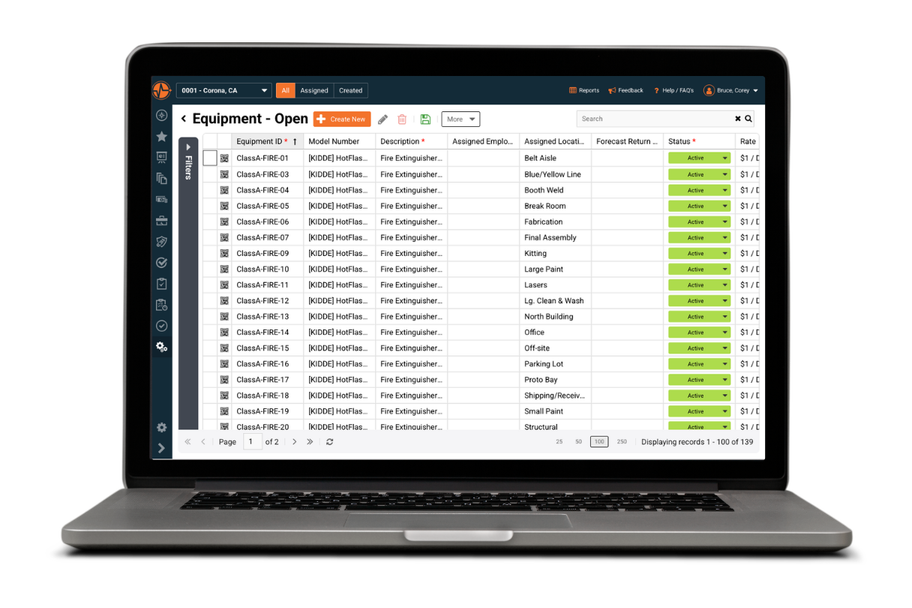
Each piece of equipment gets a permanent record with its ID, location, status and assigned employee, so nothing goes untracked.
02
Inspections that happen on time
Schedule inspections from the asset record and see planned, completed and valid-until dates before anything lapses.
03
Findings that get closed out
A failed check becomes a corrective action with an owner and a deadline, tracked until it is resolved.
> How it works
Register, inspect and close out every asset
One record per asset, from its serial number to every inspection, finding and document attached to it.
01 · Register
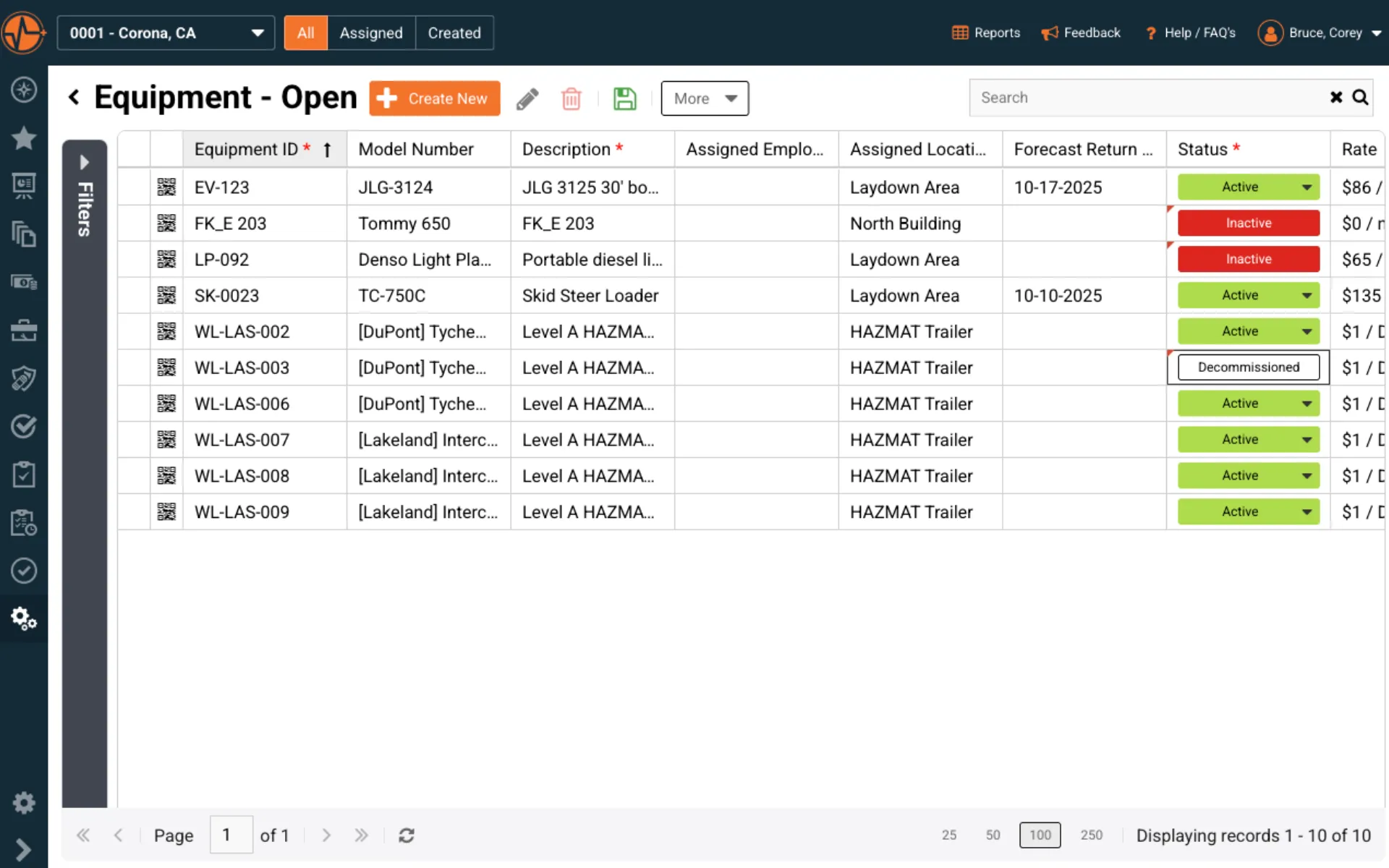
Every asset in one structured register
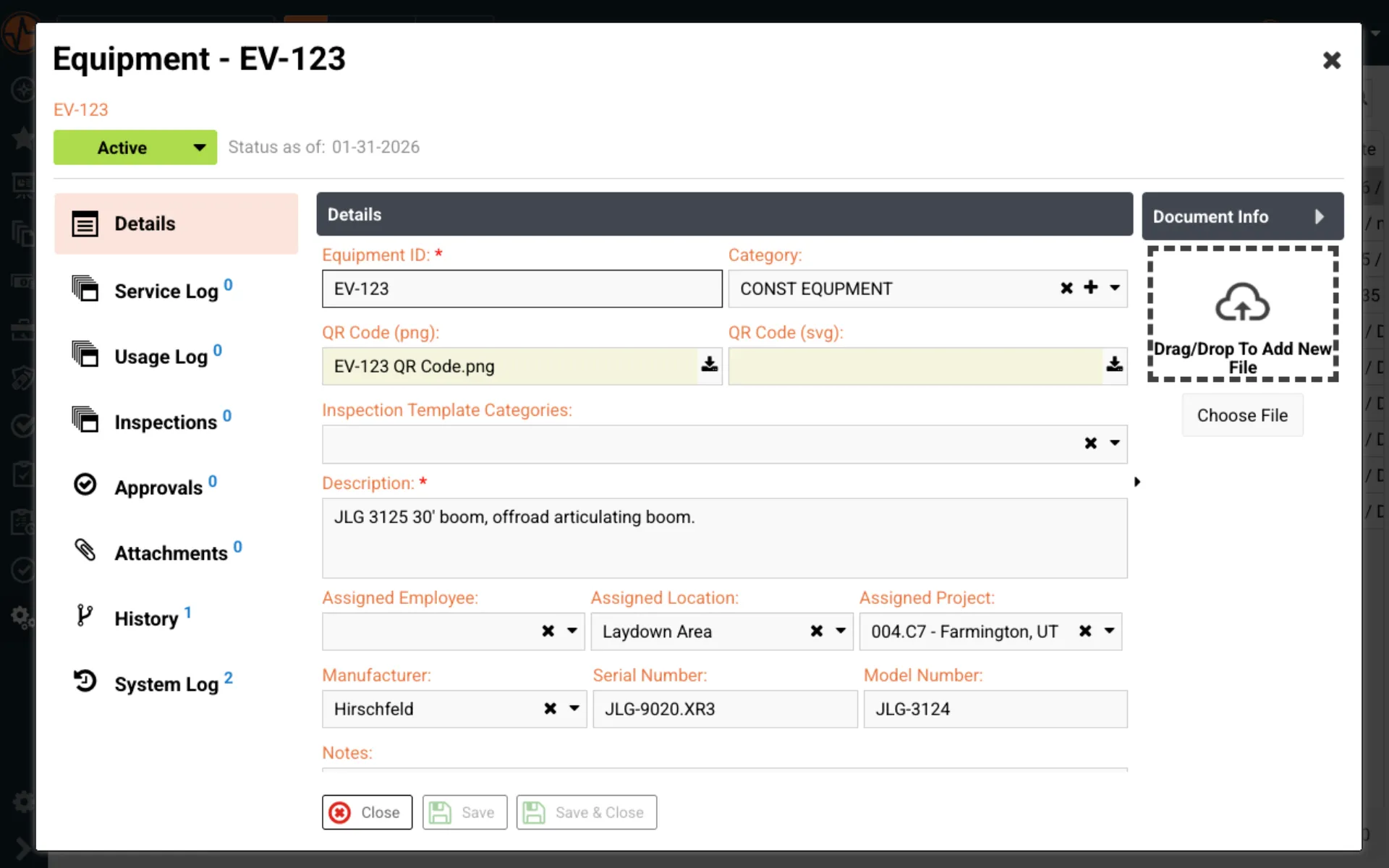
Log each piece of equipment with its unique ID, model, manufacturer, serial number, location, status and assigned employee.
- ✓Active and out-of-service status at a glance
- ✓Search and filter by category, site or project
- ✓Assigned employee and project on every asset
02 · Inspect
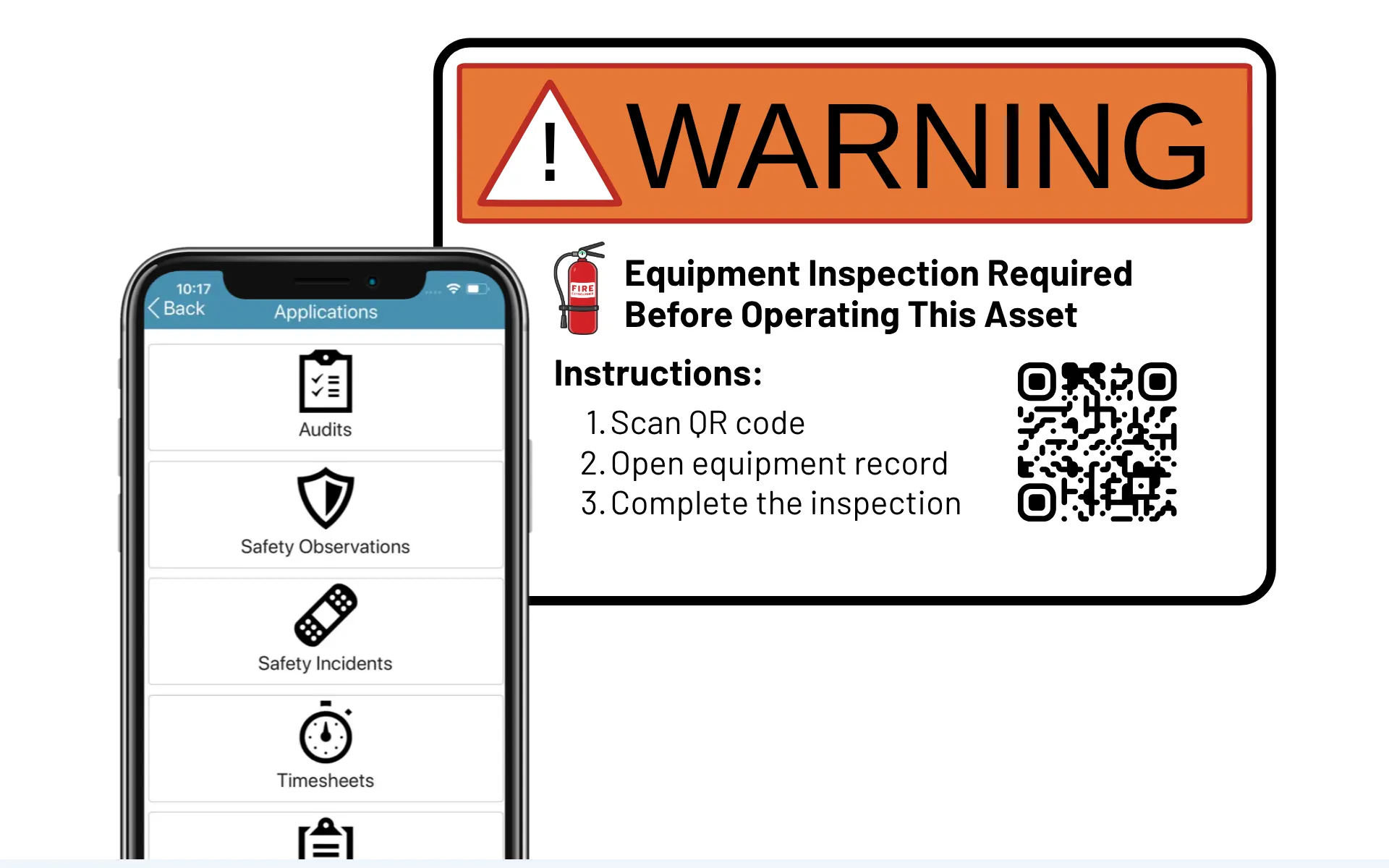
Scan a QR code and start the inspection
Workers scan the tag on a forklift, boom lift or extinguisher and land on that asset's inspection in the mobile app, online or offline.
- ✓QR codes on equipment tags and vehicles
- ✓Photos and notes captured in the field
- ✓Works offline and syncs when back in range
03 · Record
Every inspection recorded on the asset
Each completed inspection is saved straight to the equipment record, alongside its specs, location, documents and service history, so the full story of every asset lives in one place.
- ✓Inspection results saved to the asset record
- ✓Specs, location and documents alongside
- ✓Service, usage and system logs in one history
04 · Close out
Audit-ready inspection history on demand
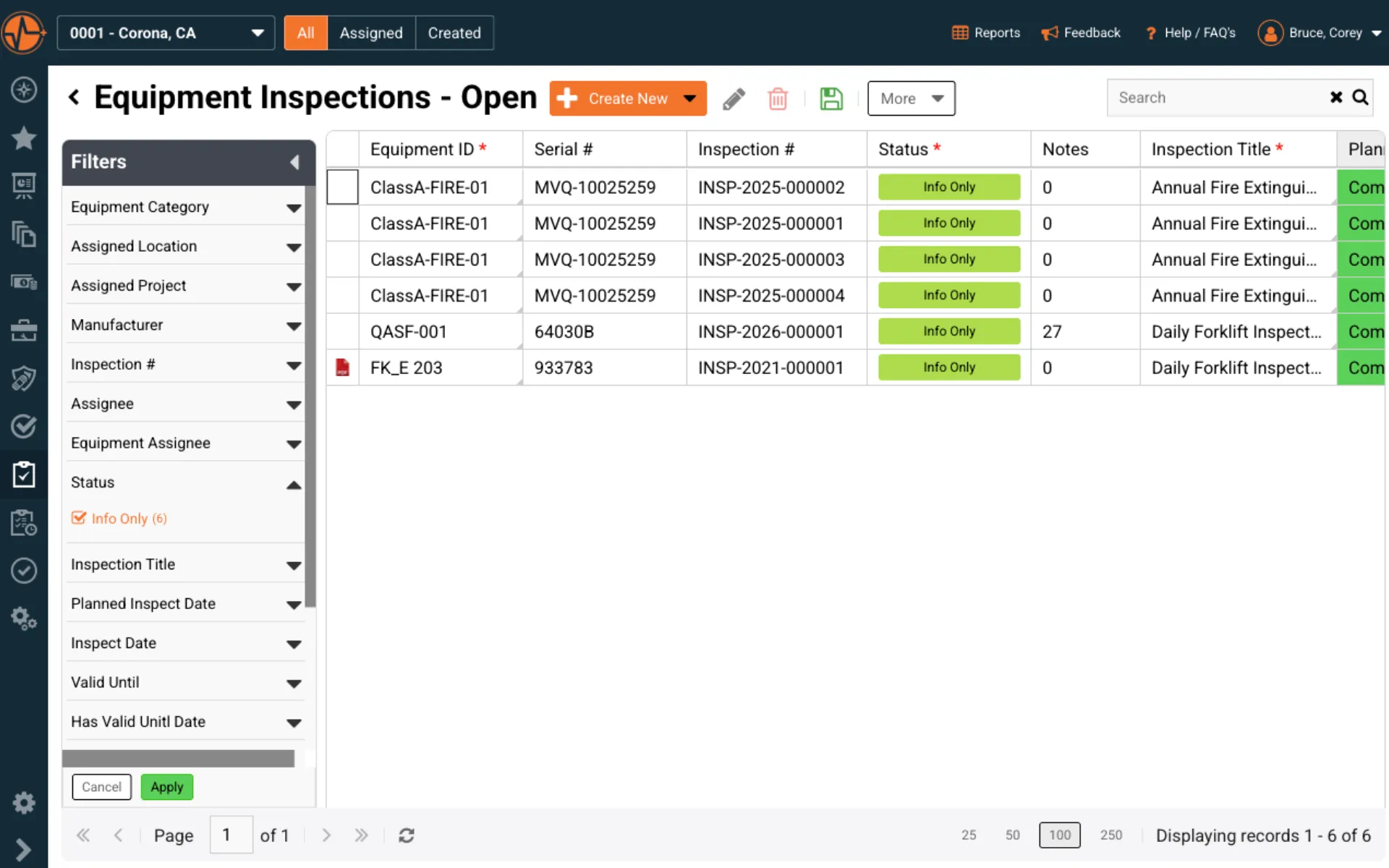
Every inspection is stored against its asset with planned, completed and valid-until dates, the assignee and the original report.
- ✓Findings become owned corrective actions
- ✓System log of who did what and when
- ✓Reports shared without giving system access
> Field guide
How often does equipment need to be inspected?
Inspection frequency comes from three places: the regulation, the industry standard and the manufacturer's manual. Whichever is strictest wins. Here are common cadences and the rule behind each one.
Before every shift
Forklifts and cranes
Forklifts must be examined before use and at least daily, or after every shift when they run around the clock. Construction cranes get a competent-person visual check each shift.
OSHA 1910.178(q)(7) · 1926.1412(d)
Monthly
Extinguishers and cranes
Portable fire extinguishers get a monthly visual inspection. Construction cranes get a documented monthly inspection, with records kept for at least three months.
OSHA 1910.157(e)(2) · 1926.1412(e)
Every six months
Extinguishers in Australia
AS 1851 sets six-monthly routine servicing for portable fire extinguishers, with yearly and five-yearly services on top.
AS 1851-2012
Every 12 months
Annual and comprehensive
Extinguishers need an annual maintenance check with the date on record. Construction cranes need a comprehensive inspection by a qualified person, with records kept for 12 months.
OSHA 1910.157(e)(3) · 1926.1412(f)
The manufacturer's schedule still applies
Under OSHA's crane standard, a manufacturer schedule that is more frequent or more thorough must be followed. In Australia, WHS Regulation 213 requires plant to be inspected and maintained by a competent person in line with the manufacturer's recommendations.
Checked
12/12
Every item recorded with its result.
Signed off
6:42am
Inspector's name and time on the record.
Due next
24hrs
Valid-until date, next check scheduled.
Closed out
✓
Defect owned, fixed and back in service.
What an inspection record needs to hold up in an audit
When an inspector asks to see a record, these are the four things it has to show. SafetyIQ captures each one on the asset record as the inspection is done.
- 1What was checked and the result. OSHA's crane standard requires the items checked and the results to be documented.
- 2Who inspected it and when. The same rule requires the inspector's name and the date on every record.
- 3When the next one is due. A valid-until date shows the asset was never used outside its inspection window.
- 4What happened to the defect. Unsafe equipment has to come out of service until it is corrected, so the fix needs an owner and a close-out date.
Sources
- OSHA 29 CFR 1910.178, Powered industrial trucks
- OSHA 29 CFR 1910.157, Portable fire extinguishers
- OSHA 29 CFR 1926.1412, Crane inspections
- WorkSafe WA, Inspection and maintenance of plant (WHS Regulation 213)
- AMSA, Inspection of portable fire extinguishers (AS 1851)
Last reviewed October 2026. General guidance, not legal advice. Confirm requirements with your regulator and the equipment manufacturer.
Customer story
“…there is plenty of evidence of what a good safety management system can do to benefit a company.”
$1M
workers' comp direct costs saved in two years
Customer Reviews of SafetyIQ
Real EHS teams improving their safety cultures with SafetyIQ. Discover how safety, risk and compliance leaders are using our platform to unify their programs, build proactive safety engagement, and drive measurable cultural change across their organizations.



> Works with
Connect equipment inspections to the rest of your safety program
Equipment safety touches audits, incidents, operator training and PPE. These modules cover the rest.
Run site audits alongside equipment checks
Audits & Inspections
Build custom checklists for site audits and inspections, with automated follow-ups and real-time reporting.
Link equipment failures to incidents
Incident Management
Document, investigate and close out incidents, including the ones traced back to an equipment defect.
Prove operators are trained and current
Training Tracking
Assign, track, and manage training so your workforce stays prepared and compliant.
Track the gear crews inspect and wear
PPE Management
Track, assign and manage personal protective equipment so the right gear reaches the right people.
> Not ready for a demo?
Get a free machinery pre-start checklist
A ready-to-use checklist operators can run before every shift to confirm plant and machinery are safe to use.
> FAQ
Equipment inspection software FAQs
What Is an Asset Register and How Does It Relate to Equipment Inspections?
An asset register is a centralized record of every piece of equipment in your operation — each asset logged with its own ID, location, status, assigned employee, manufacturer details, and service history. In SafetyIQ, the asset register is built into the Equipment Management module and serves as the foundation that the Equipment Inspections module runs on. You cannot schedule or complete an equipment inspection without the asset being registered first, because every inspection is tied directly to the specific asset it belongs to. That said, a number of organizations use the Equipment Management module as a standalone asset register — tracking and managing their equipment inventory without running formal inspection workflows on top of it. When you do activate Equipment Inspections, you get a full bird's-eye view of each asset: its inspection history, upcoming planned dates, validity periods, and any open findings, all visible from the asset record itself. It's a two-layer system where the register is the foundation and the inspections are the action layer built on top of it.
What Is Equipment Inspection Software and Why Do Organizations Need It?
Equipment inspection software is a digital system for scheduling, completing, and tracking inspections of physical assets — machinery, vehicles, tools, safety equipment, and any other equipment that requires regular checks to remain safe and compliant. Without a dedicated system, most organizations manage inspections through paper checklists, spreadsheets, or calendar reminders — all of which create gaps in records, miss validity expiry dates, and make it nearly impossible to demonstrate compliance when auditors or regulators ask for documentation. A purpose-built system eliminates those gaps by tying every inspection to a specific asset record, tracking planned and completed dates, storing reports and attachments, and alerting the right people when inspections are coming due or have lapsed. For organizations managing large equipment fleets across multiple sites, the efficiency gains alone tend to justify the investment — but the compliance and liability reduction is where the real value lies.
How Is Asset Management Software Different From a Simple Equipment List?
A spreadsheet or shared document can function as an equipment list, but it can't function as an asset management system. The difference is structure, connectivity, and action. An asset management system gives every piece of equipment a permanent, structured record that captures not just what the asset is, but where it is, who is responsible for it, what its current status is, and what has happened to it over time — service history, usage logs, inspection records, and attached documents all linked to the same record. A spreadsheet can store some of that information, but it can't automatically connect an asset to its inspection schedule, flag upcoming validity expirations, or generate an audit-ready history of everything that has been done to a piece of equipment. As equipment fleets grow and regulatory requirements become more demanding, the limitations of unstructured lists become a genuine operational and compliance risk. Asset management software resolves that by turning a static inventory into a living record that supports decision-making, accountability, and compliance across the organization.
Can Equipment Inspection Software Handle Multiple Asset Types Across Different Sites?
Yes, and for most organizations, that multi-asset, multi-site capability is the core reason for adopting a dedicated system in the first place. Different asset categories — fire extinguishers, forklifts, boom lifts, electrical equipment, vehicles — each have their own inspection requirements, frequency schedules, and validity periods. Managing those across multiple locations with a single system means every site is working from the same asset register, every inspection is tracked to the same standard, and leadership has a consistent view of compliance across the entire operation rather than relying on site-level reports that may or may not be current. Equipment categories, assigned locations, and assigned projects can all be used to filter and segment the asset register, so site managers see what's relevant to them while safety directors and operations leaders maintain the organization-wide picture.
How Does Equipment Inspection Software Support Regulatory Compliance and Audits?
Regulatory compliance for equipment typically requires organizations to demonstrate that inspections were completed on schedule, by a qualified person, with documented results — and that any findings were addressed within a defined timeframe. Equipment inspection software supports all of those requirements by creating structured, timestamped records for every inspection completed, storing the original inspection report against the asset record, tracking planned versus actual inspection dates, and logging corrective actions with their completion status. When an auditor or regulator asks for the inspection history of a specific piece of equipment, the answer is a matter of pulling the asset record rather than searching through paper files or reconciling multiple spreadsheets. For organizations subject to regular third-party audits or operating in industries with strict equipment compliance requirements — construction, mining, manufacturing, oil and gas — having that documentation organized and accessible is not just convenient, it's a regulatory necessity.
Can the Asset Register Be Used Without the Equipment Inspections Module?
Yes. The Equipment Management module functions as a standalone asset register, and a number of organizations use it exactly that way. You can log every piece of equipment with its own ID, location, status, assigned employee, manufacturer details, and service history without activating the inspection workflow on top of it. This makes it useful for teams that need a centralized, searchable record of their equipment inventory before they're ready to formalize an inspection program, or for organizations that manage inspections through a separate process but want a single source of truth for their asset data. When you're ready to add inspections, the module is already set up to support it — every asset in the register is immediately available to schedule and inspect without any duplicate data entry.
What Types of Equipment and Assets Can Be Managed in the System?
The system is designed to handle any type of physical asset that needs to be tracked, maintained, or inspected — there's no restriction on equipment category. Organizations use it to manage fire extinguishers, forklifts, boom lifts, vehicles, hand tools, electrical equipment, scaffolding, PPE, and any other assets that require regular checks or maintenance. Each asset category can be configured with its own inspection templates, frequency schedules, and validity periods, so a daily forklift pre-start check and an annual fire extinguisher inspection can both be managed in the same system without one workflow interfering with the other. For organizations with diverse equipment fleets across multiple sites, the ability to filter and segment by category, location, or project means the right people are always looking at the assets relevant to them.
Inspect every asset on time, every time
See how SafetyIQ's asset register, QR-code inspections and corrective actions fit your sites and fleet, in a demo built around how your people work.
Request a demoGet a demo built around your sites, your teams, and the way your people work.
EHS, journey, and fatigue management software for field-heavy teams.

.png)

.png)