Control every change with management of change software
Request, assess, approve and track every change to equipment, processes and people in one digital workflow, with a full audit trail from request to close-out.
Request a demo


Trusted by Leading EHS Teams




> Why SafetyIQ
Stop uncontrolled change before it becomes an incident
Every change introduces new risk. When approvals live in email chains and paper forms, things slip through. SafetyIQ gives you one workflow for every change.
01
One workflow, every change
Equipment, process, chemical and staffing changes all follow the same structured path from request to close-out.
02
Nothing approved on half the facts
Required fields, checklists and risk assessments make sure every change is fully assessed before anyone signs off.
03
Proof on demand
Approvals, history and system logs are captured automatically, so you can show your MOC process the moment an auditor asks.
> How it works
Request, approve and prove every change
A management of change process that runs itself, from the first request to the final sign-off.
01 · Request
Capture the full story behind every change
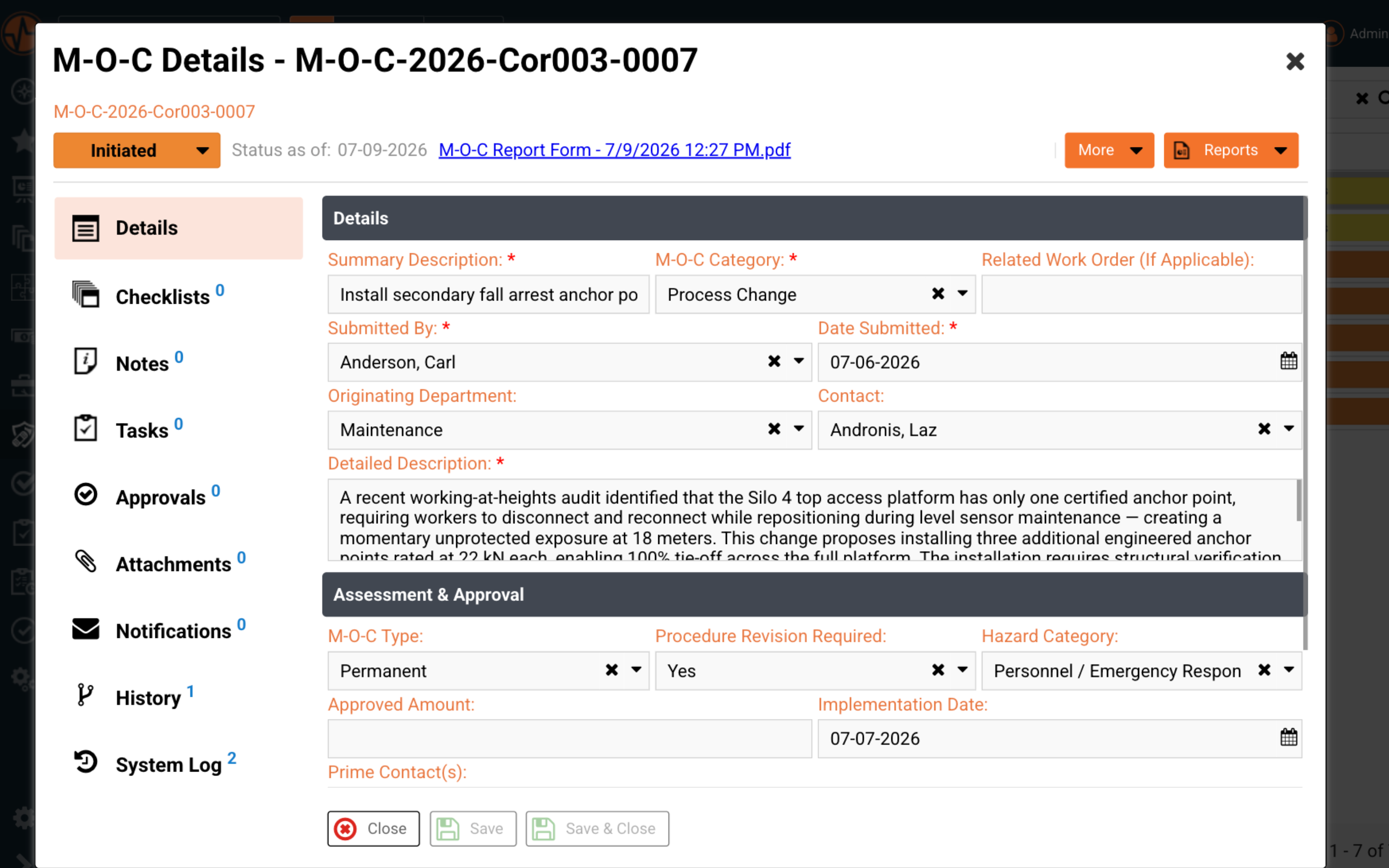
Log the who, what and why of every change with built-in fields for category, hazard type, procedure revisions and implementation dates.
- ✓Structured change requests with required fields
- ✓Checklists, notes and attachments on the record
- ✓Risk assessments linked to each change
02 · Approve
Route every change to the right people
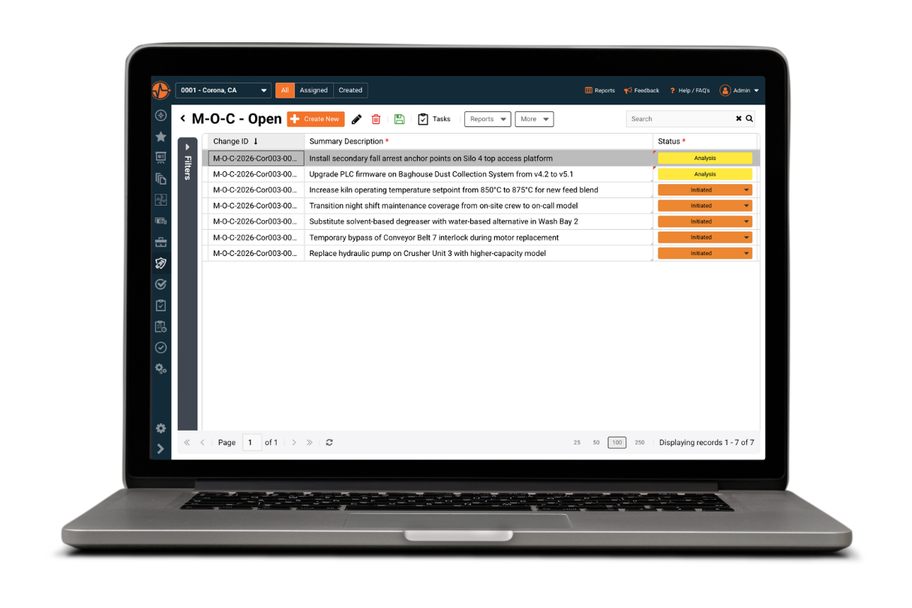
Each change moves through a clear workflow with a live status, so managers know exactly what stage it's in and what's holding it up.
- ✓Automatic routing to the right approvers
- ✓Sign-offs captured at every stage
- ✓Tasks and actions with owners and due dates
03 · Prove
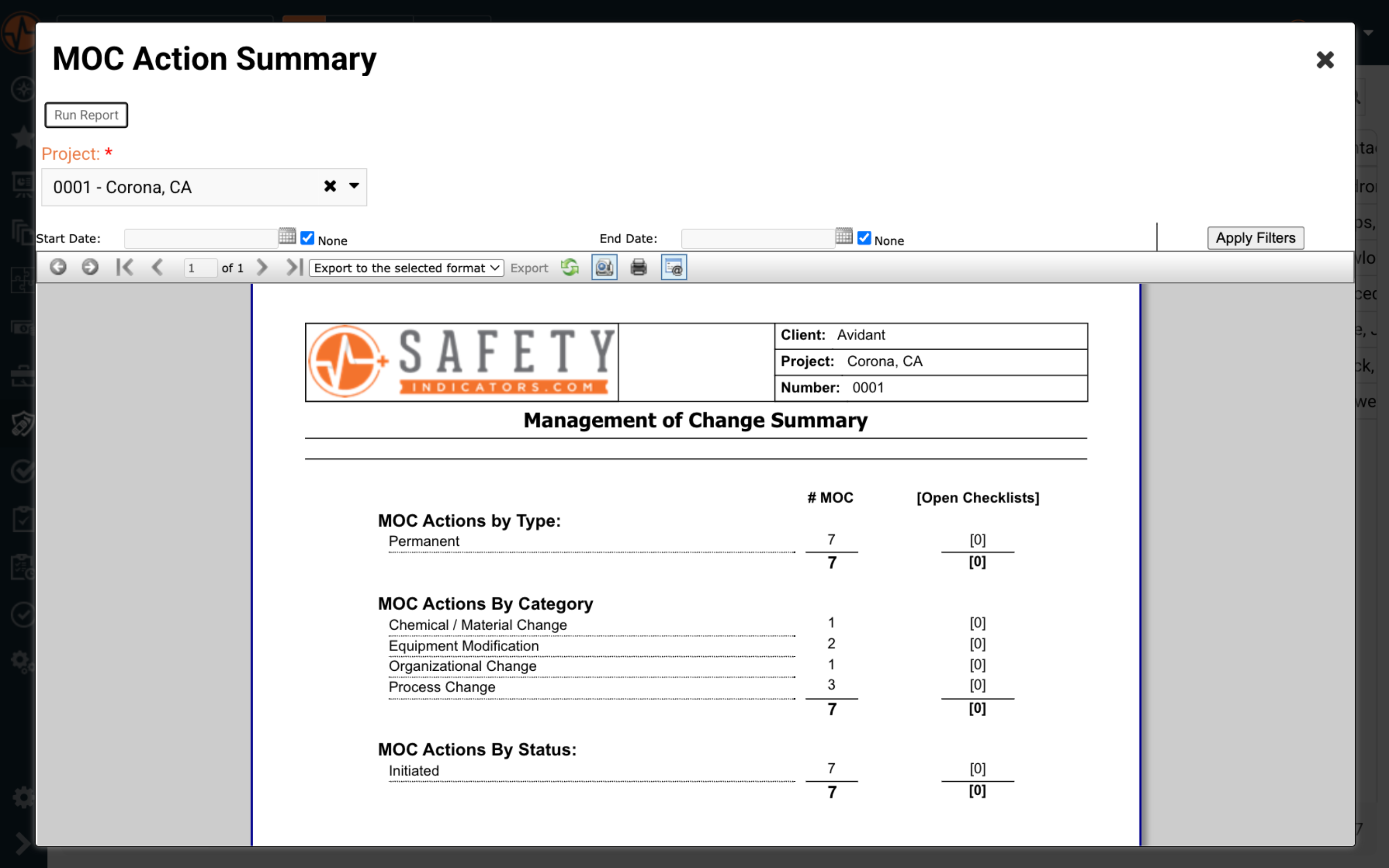
Summarize your MOC program in one click
Run a management of change summary for any project or date range, broken down by type, category and status.
- ✓One-click summaries by type, category and status
- ✓Complete history and system log on every record
- ✓Export, print or email reports for audits
> The difference
What changes when MOC moves off email
Most MOC processes live in paper forms, spreadsheets and inboxes. Here is what that looks like with and without SafetyIQ.
> Customer story
cut from workers' comp direct costs in two years
Palfinger gave its workforce one system to report hazards, log incidents and complete audits from any device, moving its aerial lift truck division from reactive to preventative safety.
Workers Comp direct cost alone has been reduced by almost one million dollars in the last two years so I would say there is plenty of evidence of what a good safety management system can do to benefit a company.
Customer Reviews of SafetyIQ
Real EHS teams improving their safety cultures with SafetyIQ. Discover how safety, risk and compliance leaders are using our platform to unify their programs, build proactive safety engagement, and drive measurable cultural change across their organizations.


> Works with
Connect change to the rest of your safety program
Change touches risk, procedures and training. These modules cover the rest.
Assess the risk of a change
Hazard & Risk Management
Identify hazards early and address them before they lead to safety incidents.
Revise procedures after a change
Document Management
Organize, manage, and track every safety document to keep teams aligned.
Retrain people after a change
Training Tracking
Assign, track, and manage training so your workforce stays prepared and compliant.
Verify the change on site
Audits & Inspections
Stay audit-ready year-round with fast, paper-free audits and inspections.
> Not ready for a demo?
Read the MOC guide for safety professionals
A practical look at how safety professionals manage change without putting people or operations at risk.
> FAQ
Management of change software FAQs
What Is Management of Change (MOC) Software?
Management of change software digitizes the process of requesting, assessing, approving and tracking changes to equipment, processes, chemicals and personnel. Instead of paper forms, spreadsheets and email approvals, every change follows a structured digital workflow — from initial request through risk assessment, approval, implementation and close-out. That means every change is evaluated for hazards before it's implemented, every decision is documented and nothing slips through the cracks. MOC software also gives safety leaders something paper-based systems simply can't provide: real-time visibility into every open change across every site, in one place. The result is a change management process that's faster for the people submitting requests, easier for the people approving them and defensible when someone asks you to prove it's being followed. For organizations still managing change through email chains and shared drives, the difference is immediate — approval times drop, documentation gaps close and the MOC process stops being the bottleneck people work around.
Who Needs MOC Software?
Any organization in a high-risk industry — mining, manufacturing, energy, construction, oil and gas, chemicals — where changes to equipment, processes or staffing can introduce new hazards. It's especially critical for facilities covered by OSHA's Process Safety Management (PSM) standard, which requires a formal, documented MOC procedure and is one of the most frequently cited elements in PSM enforcement. But the need extends well beyond regulated environments. Incident investigations routinely trace back to uncontrolled change: equipment modified without engineering review, procedures that no longer match how the work is actually done, temporary fixes that became permanent and workers never trained on hazards that didn't exist when they were onboarded. If your organization manages change through verbal approvals, email threads or a form that lives in a binder, you have an MOC process that works right up until the day it doesn't. MOC software closes that gap — and it scales, so the same process that governs a single-site chemical substitution also governs a multi-site organizational restructure.
Why Is Managing Change Important for Safety?
Because change is where risk enters an operation that was previously under control. Your procedures, training, equipment and safeguards were all designed around how things were — and every change, however small, has the potential to quietly invalidate some of them. A new pump runs at a different pressure. A substituted chemical carries a different exposure risk. A restructured night shift changes who's available in an emergency. History's worst industrial disasters, including Flixborough and Bhopal, involved changes that were never properly assessed — and the same pattern plays out at smaller scale on ordinary sites every day. A strong MOC process forces the critical questions to be asked before implementation: What hazards does this introduce? What procedures need to change? Who needs to be trained? Who needs to approve it? MOC software makes sure those questions get asked every time, not just when someone remembers — and it creates the record proving they were.
How Does the Approval Process Work?
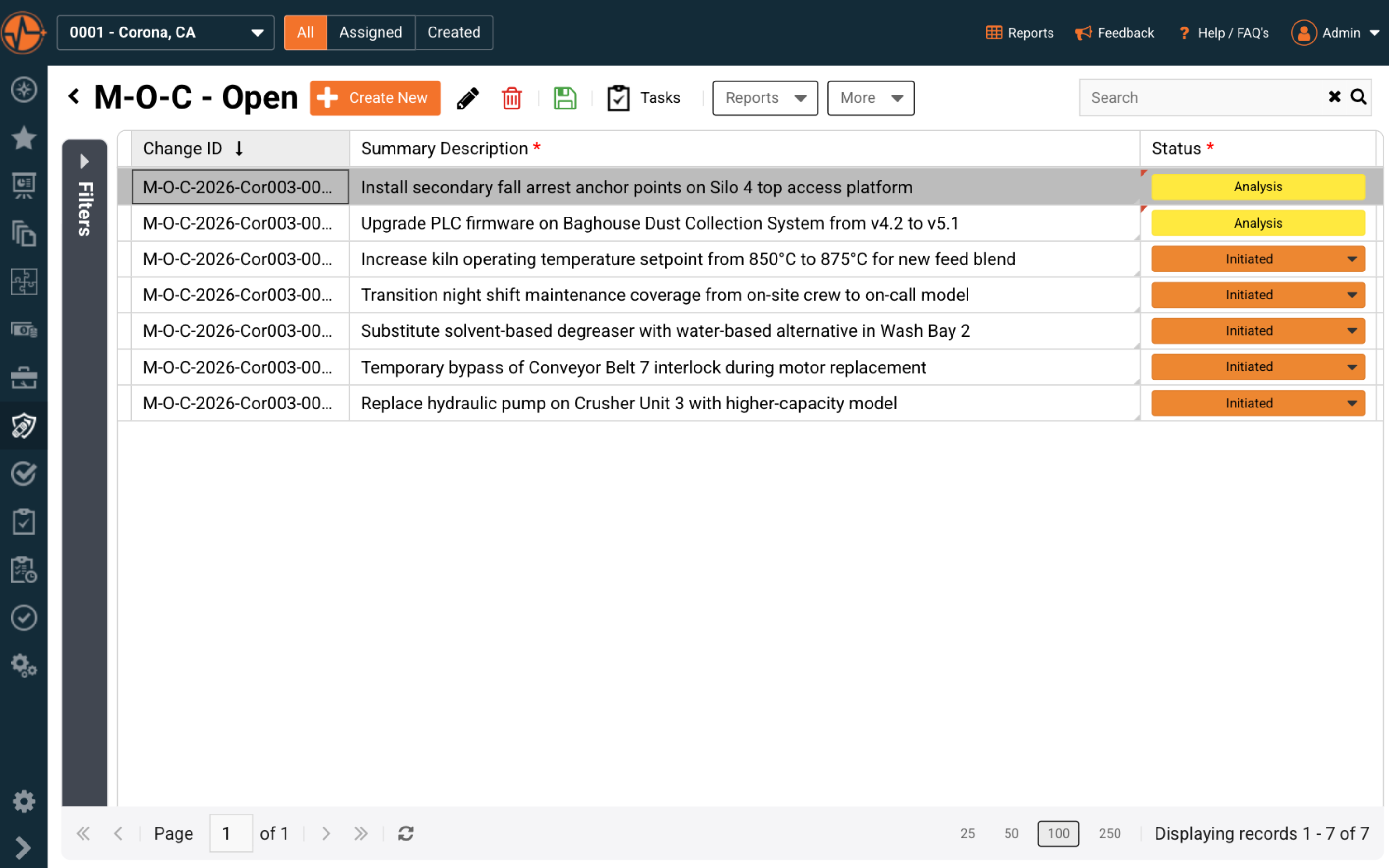
Each change request is routed through a defined workflow — from initiation through analysis to approval and implementation — with sign-offs captured at every stage. When a change is submitted, required fields ensure it arrives with complete information: category, type, hazard classification, detailed description and implementation dates. From there, approvers are notified automatically the moment a change is waiting on them, so requests don't stall in inboxes or sit forgotten on someone's desk. The status of every change is visible at a glance from the MOC register — initiated, in analysis, approved — so managers always know where things stand and what's holding them up. Nothing moves to the next stage without the required sign-off, and nothing gets implemented without the right people reviewing it first. The full approval history, including who signed off and when, is stored permanently on the record, so accountability is built in rather than reconstructed after the fact.
Can My Organization Attach Supporting Documents to an MOC?
Yes. Checklists, risk assessments, procedures, drawings, photos and notes can all be attached directly to the change record, so everything related to a change lives in one place rather than scattered across shared drives, email attachments and filing cabinets. Field teams can add photos straight from a mobile device — the corroded pump, the proposed anchor point location, the label on the new chemical. Engineers can attach revised procedures, P&IDs and vendor documentation. Reviewers can complete built-in checklists without ever leaving the record, and notes capture the discussion and reasoning behind decisions that would otherwise live only in meeting minutes or memory. The practical payoff comes later: when an auditor asks how a change was assessed, or an incident investigation needs to reconstruct what was known at the time, the evidence is already attached to the record — complete, timestamped and exactly where it should be.
Does SafetyIQ's MOC Software Support Audits and Compliance?
Every MOC includes a complete history, system log and approval trail showing exactly who did what and when — automatically, without anyone having to remember to document it. When audit time comes, you can run summary reports by type, category and status in one click, filtered by project, site or date range, then export, print or email them directly. That turns audit preparation from days of gathering paperwork into minutes of running reports. More importantly, it changes what you can demonstrate: not just that an MOC procedure exists on paper, but that it's actually being followed — every change logged, every approval captured, every action closed out. Whether it's an internal review, a corporate audit, an insurer's assessment or a regulator investigating after an incident, you have defensible records on demand. And because the audit trail builds itself as work happens, compliance stops being a separate activity your team has to find time for.
What Does OSHA Require for Management of Change?
Under OSHA's Process Safety Management standard (29 CFR 1910.119(l)), covered facilities must establish and implement written procedures to manage changes to process chemicals, technology, equipment, procedures and changes to facilities that affect a covered process. Before any change is implemented, the employer must address its technical basis, the impact on safety and health, modifications to operating procedures, the necessary time period for the change and authorization requirements. Employees affected by the change must be informed and trained before startup, and process safety information and operating procedures must be updated accordingly. MOC is consistently among the most frequently cited PSM elements in OSHA enforcement — not because companies lack a written procedure, but because they can't demonstrate it was followed for every change. That's the gap MOC software closes: it enforces the required steps on every change and generates the documentation proving it.
Take control of every change
See how SafetyIQ's change requests, approval workflows and one-click summaries fit your sites and teams, in a demo built around how your people work.
Request a demoGet a demo built around your sites, your teams, and the way your people work.
EHS, journey, and fatigue management software for field-heavy teams.

.png)

.png)