
Top 11 Best CAPA Software in 2026
Compare the 10 best CAPA software platforms of 2026, including features, integrations, and pricing for MasterControl, Qualio, TrackWise & more. See the full list.

TL;DR: The best CAPA software in 2026 includes SafetyIQ, MasterControl Quality Excellence, ComplianceQuest (CQ), TrackWise Digital (Honeywell), Qualio, Greenlight Guru, AssurX, Intellect QMS, SafetyCulture, Ideagen, and QT9 QMS. The right choice depends on your industry (field-based EHS vs. life sciences vs. manufacturing), company size, and whether you need a broader EHS platform with CAPA built in, a full quality management system (QMS), or a standalone CAPA tool.
CAPA (Corrective and Preventive Action) software helps regulated companies identify quality issues, investigate root causes, implement fixes, and prove — with a documented audit trail — that the problem won't happen again. It's a core requirement under FDA 21 CFR Part 820, ISO 9001, ISO 13485, IATF 16949, and GMP guidelines, which is why most CAPA tools ship as a module inside a broader QMS rather than a standalone app.
Below is a ranked, comparison-ready list of the top CAPA software platforms — spanning traditional quality management systems (QMS) and EHS software platforms with CAPA built in — what each one does best, and a table you can use to compare them side by side.
How We Picked These Top Corrective and Preventive Action (CAPA) Software Tools
Each platform below was evaluated on:
- Regulatory fit — support for FDA, ISO, IATF, and GMP requirements
- Root cause analysis tools — 5 Whys, Fishbone/Ishikawa, 8D, Pareto
- Workflow automation — routing, escalation, approvals, and closed-loop verification
- Integration depth — connections to document control, training, audit, supplier quality, ERP, and MES
- Usability — mobile access, configurability, and implementation time
1. SafetyIQ
Best for: Distributed EHS and safety teams in construction, oil and gas, mining, automotive, and other field-heavy industries.
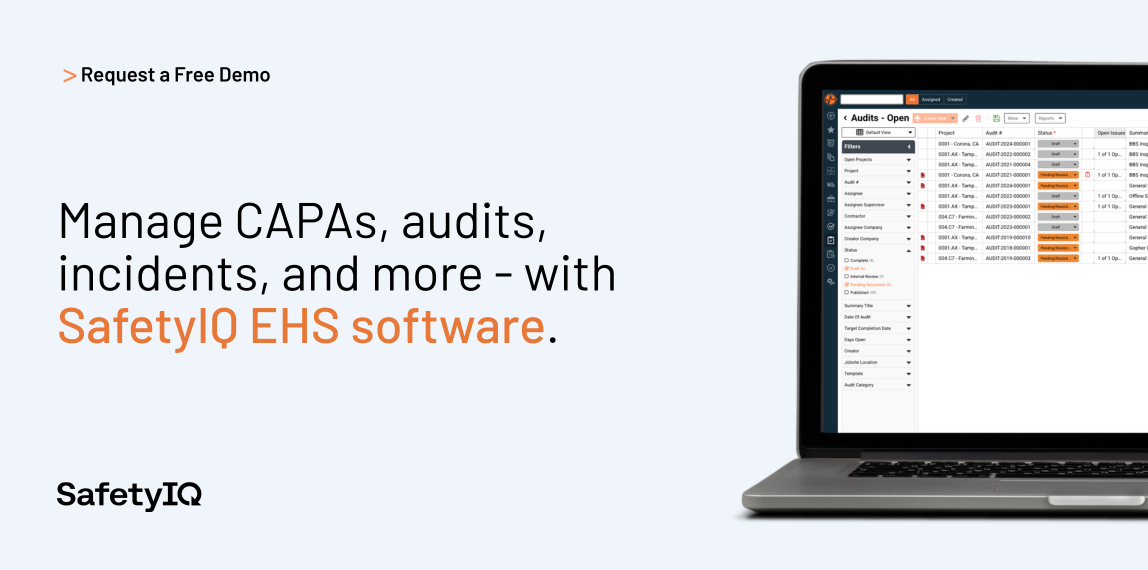
SafetyIQ is an EHS (Environment, Health, and Safety) platform that treats CAPA as part of a broader safety and compliance workflow rather than a standalone quality module. Corrective and preventive actions are generated directly from incidents, audits, and inspections, giving safety leaders a single system of record across sites and field teams — including offline data capture for workers without reliable connectivity.
Key features:
- CAPA tied directly to incident management and root cause analysis
- Mobile and offline data capture for field and frontline workers
- OSHA recordkeeping and compliance/audit management built in
- Real-time dashboards for tracking corrective action status across sites
Website: safetyiq.com
2. MasterControl Quality Excellence
Best for: Life sciences and medical device companies needing enterprise-grade, audit-ready CAPA.
MasterControl is one of the longest-standing names in regulated quality management. Its CAPA module is closed-loop and highly configurable, connecting directly to document control, training records, audits, and complaints so a single quality event can trigger every downstream action automatically.
Key features:
- Closed-loop CAPA tied to document control and training
- Configurable workflows with electronic signatures (21 CFR Part 11)
- Risk-based prioritization and trend analytics
- Deep integration with MasterControl's broader QMS suite
Website: mastercontrol.com
3. ComplianceQuest (CQ)
Best for: Enterprises wanting AI-assisted root cause detection on a Salesforce-native platform.
ComplianceQuest CAPA supports multiple investigation methodologies (8D, 5W-2H, World Class Manufacturing) and uses predictive analytics to flag recurring issues before they escalate. It's part of a unified EQMS covering nonconformance, complaints, supplier management, and audits.
Key features:
- AI-driven trend and signal detection
- Multiple root cause methodologies (8D, 5W-2H, WCM)
- Native integration with Salesforce ecosystem
- Unified nonconformance-to-CAPA workflow
Website: compliancequest.com
4. TrackWise Digital (Honeywell / Sparta Systems)
Best for: Large pharmaceutical and life sciences organizations managing high complaint or deviation volumes.
TrackWise Digital, now part of Honeywell, is a market leader in life sciences quality management. Its CAPA module is fully integrated with complaints, audits, change control, and nonconformance, and now includes AI features like auto-summarization for faster investigations.
Key features:
- AI-enabled auto-summarization and auto-categorization
- Built on Salesforce for scalability and security
- Strong supplier quality and change control integration
- Proven at enterprise scale (400,000+ complaints/year handled by some customers)
Website: spartasystems.com
5. Qualio
Best for: Growing life sciences and medtech companies that want fast implementation over legacy complexity.
Qualio is a cloud-native QMS built specifically for scaling life sciences companies. Its CAPA workflows are simpler to stand up than legacy enterprise systems, making it a common choice for startups and mid-market medical device and biotech teams that still need FDA/ISO-grade documentation.
Key features:
- Fast implementation, minimal IT overhead
- CAPA linked to document control and training automatically
- Built for FDA 21 CFR Part 820 and ISO 13485
- Modern, easy-to-use interface
Website: qualio.com
6. Greenlight Guru
Best for: Medical device companies wanting CAPA purpose-built around device-specific regulatory workflows.
Greenlight Guru was designed exclusively for medical device makers, so its CAPA module maps directly to FDA and ISO 13485 requirements without needing heavy customization. It helps teams move from proactive risk identification to documented resolution plans faster than general-purpose QMS tools.
Key features:
- Purpose-built for medical device regulatory workflows
- Native links to risk management (ISO 14971) and design controls
- Investigative tools for root cause studies
- Strong audit-readiness reporting
Website: greenlight.guru
7. AssurX
Best for: High-risk industries (food manufacturing, life sciences, industrial manufacturing) needing configurable, compliance-first CAPA.
AssurX has served regulated manufacturers for over two decades. Its CAPA software automates paperwork-heavy processes, mitigates hazard risk, and integrates with MES, LIMS, ERP, and CRM systems, making it a strong fit for companies with complex, multi-system quality environments.
Key features:
- Broad integrations: MES, LIMS, ERP, CRM
- Highly configurable workflow engine
- Hazard mitigation and training automation
- Long track record in regulated manufacturing
Website: assurx.com
8. Intellect QMS
Best for: Companies needing offline/mobile CAPA execution across multiple or remote sites.
Intellect's no-code QMS platform recently added enhanced mobile connectivity with offline functionality, letting field and plant teams log and act on CAPAs even without a live connection — a meaningful advantage for distributed manufacturing operations.
Key features:
- No-code configuration for custom CAPA workflows
- Offline mobile functionality for remote sites
- Built-in analytics dashboards
- Rapid deployment compared to legacy enterprise QMS
Website: intellect.com
9. SafetyCulture
Best for: Frontline, multi-location operations (retail, food service, field inspections) that need CAPA tied directly to inspections.
SafetyCulture (formerly iAuditor) digitizes inspections and turns failed checklist items into corrective and preventive actions automatically. It's less about heavy regulatory documentation and more about closing the loop fast across many physical locations.
Key features:
- CAPA auto-generated from failed inspection items
- Custom and template-based checklist library
- Scheduling for CAPA review meetings
- Strong mobile-first design for frontline teams
Website: safetyculture.com
10. Ideagen
Best for: Organizations wanting a straightforward, user-friendly CAPA module inside a broader governance/quality platform.
Ideagen focuses on making issue identification, corrective action planning, and reporting simple for teams that don't want a heavy learning curve, while still supporting continuous improvement and compliance reporting.
Key features:
- User-friendly issue identification and planning tools
- Streamlined reporting for continuous improvement
- Part of a wider governance, risk, and compliance (GRC) suite
- Configurable to multiple regulated industries
Website: ideagen.com
11. QT9 QMS
Best for: Manufacturers wanting fast CAPA closure using structured 8D methodology.
QT9 QMS markets itself around cutting CAPA closure time and reducing repeat issues through built-in 8D and root cause tools, combined with automated task routing and audit-ready reporting — a good fit for mid-size manufacturers modernizing from paper or spreadsheets.
Key features:
- Built-in 8D methodology and root cause tools
- Automated task routing with deadlines and reminders
- Risk severity scoring
- Free trial available
Website: qt9software.com
Comparison Table of the Top 11 Best CAPA Software
Below is a side-by-side comparison.
Disclosure: This list is not sponsored or ranked by paid placement. Pricing, features, and integrations change frequently — confirm current details directly with each vendor before purchasing.
How to Choose the Right Corrective and Preventive Action Software in 2026
Start with your regulatory framework
FDA-regulated life sciences and medical device companies need CAPA tools built around 21 CFR Part 820 and ISO 13485, not general-purpose issue trackers.
Decide standalone vs. full QMS
If you already have document control, training, and audit management elsewhere, a standalone CAPA tool may be enough. Most regulated companies are better served by CAPA as one module inside a connected QMS, since regulators expect traceability across the whole quality system, not just the CAPA record.
Check root cause analysis depth
Look for built-in 5 Whys, Fishbone/Ishikawa diagrams, Pareto analysis, or 8D — not just a free-text investigation field.
Confirm CAPA integration needs
If CAPAs should be able to originate from a customer complaint, an audit finding, or an MES/ERP event, verify the vendor supports that specific integration.
Test the mobile/offline experience
If you have frontline or remote teams that need to log and close actions without always being at a desktop.
Frequently Asked Questions About Corrective and Preventive Action Software
What is CAPA software and why do companies need it?
CAPA software is a digital system that helps organizations manage the full lifecycle of a quality problem: identifying the issue, investigating its root cause, implementing a corrective action to fix it, and implementing a preventive action to stop it from happening again — or from happening elsewhere in the organization. Before CAPA software existed, most companies tracked this process through spreadsheets, email chains, and paper forms, which made it difficult to prove to auditors and regulators that a structured, repeatable process was actually being followed. Regulated industries — including pharmaceuticals, medical devices, food and beverage, automotive, and aerospace — are required by standards like FDA 21 CFR Part 820, ISO 9001, ISO 13485, and IATF 16949 to maintain a documented, closed-loop CAPA process.
Software solves this by creating a time-stamped, auditable record of every step: who reported the issue, what investigation was performed, what action was taken, who approved it, and how its effectiveness was verified afterward. Beyond compliance, CAPA software also gives quality leaders visibility into recurring problems across departments or locations, which supports genuine continuous improvement rather than just firefighting the same issue repeatedly. In short, companies need CAPA software both to meet legal/regulatory obligations and to reduce the operational cost of repeat defects, recalls, and customer complaints.
What's the difference between a corrective action and a preventive action?
A corrective action addresses a problem that has already occurred — it's reactive by definition. For example, if a batch of product fails a quality inspection, the corrective action might involve reworking or scrapping that batch, retraining the operator involved, and fixing the immediate cause of the defect. A preventive action, by contrast, is proactive: it addresses a risk or a pattern that hasn't caused a failure yet but could, if left unaddressed.
For example, if trend data shows a particular machine is drifting out of calibration tolerance more often than expected, a preventive action might involve adjusting the maintenance schedule before that drift causes an actual defect. In practice, well-run CAPA processes treat these as two connected but distinct disciplines: correction fixes what's broken right now, while prevention uses root cause analysis and trend data to stop a similar failure from occurring anywhere else in the system. Many CAPA software platforms formally separate these two threads in their workflows, requiring documented root cause analysis before a preventive action can be approved, since regulators specifically want to see evidence that a company looked beyond the immediate symptom to the systemic cause.
Which industries are legally required to use a CAPA process?
CAPA processes are a formal regulatory requirement in several industries, though the specific standard varies. In the United States, medical device manufacturers must comply with FDA 21 CFR Part 820.100, which explicitly requires companies to establish and maintain procedures for implementing corrective and preventive actions, including analyzing quality data, investigating root causes, verifying that actions are effective, and documenting the results.
Pharmaceutical manufacturers operate under Good Manufacturing Practice (GMP) guidelines, which carry similar CAPA documentation expectations even though the requirement isn't always spelled out as literally as it is for devices. Companies certified to ISO 9001 (general quality management), ISO 13485 (medical devices), or IATF 16949 (automotive) must also demonstrate a functioning CAPA process to maintain certification, since corrective and preventive action is a core clause in each of these standards.
Food and beverage manufacturers following HACCP (Hazard Analysis and Critical Control Points) principles use CAPA-style processes to respond to safety deviations and prevent recalls. Aerospace manufacturers under AS9100 face comparable requirements. Even companies outside these formally regulated categories increasingly adopt CAPA software voluntarily, because the discipline of root-cause-driven problem solving reduces rework and customer complaints regardless of whether a regulator is requiring it.
How much does corrective and preventive action software typically cost?
CAPA software pricing varies widely depending on whether you're buying a standalone tool or a full quality management system (QMS) with CAPA as one module, and depending on company size, user count, and industry complexity. At the lower end, cloud-based tools aimed at small and mid-sized companies — often priced per user, per month — can start in the low hundreds of dollars monthly for a small team, with some vendors offering free trials or limited free tiers to test the workflow before committing.
Mid-market platforms built for regulated industries like medical devices or food manufacturing typically move into the thousands of dollars per year range once you account for implementation, validation support (important for FDA-regulated companies, since software used in a regulated process often needs computer system validation), and training. Enterprise-grade QMS platforms used by large pharmaceutical or automotive manufacturers, which bundle CAPA with document control, training management, supplier quality, complaints handling, and advanced analytics, commonly run into the tens of thousands of dollars annually or more, with pricing usually quoted through a custom sales process rather than published rate cards. When budgeting, it's worth factoring in not just the license cost but implementation time, data migration from legacy systems, ongoing validation maintenance for regulated environments, and training costs, since these often meaningfully exceed the software subscription itself in the first year.
How long does it take to implement CAPA software?
Implementation timelines depend heavily on company size, regulatory complexity, and how much of the existing CAPA process needs to be redesigned versus simply digitized. A small or mid-sized company adopting a modern, cloud-native CAPA tool with pre-built templates can often go live in a matter of weeks, particularly if they're replacing spreadsheets or paper forms with relatively simple workflows and don't require extensive custom configuration. Larger, more heavily regulated organizations — especially in pharmaceuticals, medical devices, or automotive — typically face longer timelines, often several months to a year, because implementation includes not just software configuration but also computer system validation (CSV) to prove the software performs as intended in a regulated environment, data migration from legacy systems, integration with existing document control, training, and ERP/MES systems, and formal user training and change management across quality, operations, and compliance teams.
Companies switching from an established legacy CAPA system to a new platform also need to carefully plan how historical CAPA records will be migrated or archived, since auditors may still request access to older records during an inspection. A realistic way to plan a rollout is to pilot the CAPA module with one site, product line, or department first, validate that workflows and reporting meet regulatory expectations, and then expand company-wide — this phased approach reduces the risk of disrupting an active quality system mid-implementation.
This article was last reviewed in July 2026. CAPA software features, pricing, and vendor positioning change frequently — always confirm current capabilities directly with vendors before making a purchasing decision.
SafetyIQ brings incidents, inspections, training, journey management, lone worker safety and fatigue into one mobile app. Tell us about your crews and sites for tailored pricing.
Safety insights, straight to your inbox
New guides, monthly safety topics and SafetyIQ updates for EHS and operations leaders. Unsubscribe anytime.



Get a demo built around your sites, your teams, and the way your people work.
EHS, journey, and fatigue management software for field-heavy teams.

.png)

.png)