
OSHA Injury Tracking Application (ITA): Requirements & Deadlines
Everything safety teams need to know about OSHA's Injury Tracking Application (ITA). Who must submit, what data is required, and how to meet the March 2 deadline.
If you're responsible for OSHA recordkeeping at your organization, the Injury Tracking Application, better known as the ITA, is a system you need to understand inside and out. Missing a submission deadline, submitting incomplete data, or not knowing whether your establishment is even required to submit can result in citations, penalties, and unwanted OSHA attention. This guide covers everything safety professionals need to know about the ITA: what it is, who must use it, how to submit correctly, and how to avoid the compliance pitfalls that catch organizations off guard every year.
What Is OSHA's Injury Tracking Application (ITA)?
The Injury Tracking Application (ITA) is OSHA's secure, web-based portal for collecting workplace injury and illness data from employers across the United States. It lives here and serves as the central hub where covered establishments submit their annual OSHA recordkeeping data electronically.
The ITA was launched in 2017 following OSHA's updated electronic recordkeeping rule, which required certain employers to move away from paper-only recordkeeping and begin submitting injury and illness data digitally. The underlying goal was straightforward: give OSHA access to a large-scale, nationwide dataset of workplace injuries that could be used to identify high-hazard industries, target inspection resources more effectively, and ultimately drive down injury and illness rates across the American workforce.
For EHS teams, the ITA is where your OSHA 300A Summary data, and in some cases your full 300 Log and 301 Incident Report data, goes at the end of each recordkeeping year. It is not a replacement for maintaining your physical or digital records on-site. It is a submission and reporting layer on top of your existing recordkeeping obligations.
Why the ITA Matters Beyond Compliance
It's tempting to treat the ITA as just another regulatory checkbox. But understanding what OSHA does with the data you submit changes how you think about it.
OSHA uses ITA data to calculate establishment-level injury rates, which become part of the public record. This data informs OSHA's Site-Specific Targeting (SST) program, which uses injury rate benchmarks to identify establishments for programmed inspections. In plain terms: if your submitted data shows injury rates significantly above your industry average, your establishment may be flagged for an OSHA inspection - not because of a complaint or an incident, but purely because of what your ITA submission revealed.
Your ITA data is also publicly accessible. OSHA publishes establishment-level injury and illness data on its website, meaning customers, contractors, insurers, and potential employees can look up your injury rates. For many organizations, this is a reputational consideration that goes well beyond regulatory compliance.
Who Is Required to Submit Data Through the ITA?
Not every employer covered by OSHA recordkeeping requirements must submit data to the ITA. The electronic submission requirement depends on your establishment size and industry classification.
Establishments with 250 or More Employees
If your establishment had 250 or more employees at any point during the previous calendar year and is in an industry covered by OSHA's recordkeeping rule, you are required to submit your OSHA 300A Summary data electronically through the ITA each year.
Note the word "establishment" — OSHA's recordkeeping rules apply at the establishment level, not the company level. A corporation with multiple locations evaluates each location independently for ITA submission requirements.
Establishments with 20 to 249 Employees in High-Hazard Industries
Establishments with 20 to 249 employees are required to submit 300A data electronically if they operate in a designated high-hazard industry. OSHA publishes the full list of covered NAICS codes, but high-hazard industries generally include:
- Agriculture, forestry, fishing, and hunting
- Construction
- Manufacturing (most subsectors)
- Wholesale trade (certain subsectors)
- Retail trade (certain subsectors)
- Transportation and warehousing
- Utilities
- Healthcare and social assistance (certain subsectors)
- Mining
If your NAICS code appears on OSHA's high-hazard list and you have between 20 and 249 employees, ITA submission is mandatory regardless of whether you've had any recordable incidents during the year.
What Data Must Be Submitted?
As of current OSHA regulations, all covered establishments are required to submit their OSHA 300A Summary data annually. The requirement to submit full 300 Log and 301 Incident Report data — which was part of OSHA's original 2016 electronic recordkeeping rule — has been modified over time through regulatory changes and legal challenges. EHS professionals should verify the current submission requirements directly with OSHA or through legal counsel, as this specific aspect of the rule has been subject to ongoing regulatory activity.
What has remained consistent is the 300A submission requirement for covered establishments, and that's the foundation of ITA compliance for most organizations.
ITA Submission Deadlines
The annual deadline for submitting prior-year data through the ITA is March 2. That means your 2025 recordkeeping data must be submitted by March 2, 2026.
This deadline is firm. OSHA does not offer grace periods, and late submission is treated as a failure to submit — which is a recordkeeping violation. Build the March 2 deadline into your annual EHS calendar with enough lead time to gather your data, verify its accuracy, and complete the submission without scrambling.
A practical EHS calendar for ITA compliance looks something like this:
- January: Close out your 300 Log for the prior year, finalize day counts for any ongoing cases, and begin compiling 300A totals.
- Early February: Complete and certify your 300A. Post it in the workplace by February 1.
- Mid-February: Log into the ITA, verify your establishment information is current, and enter your 300A data.
- By March 2: Submit. Confirm your submission was accepted and save your confirmation.
- April 30: Take down your posted 300A. The posting period ends.
How to Use the ITA: A Step-by-Step Walkthrough
Step 1: Create or Access Your ITA Account
The ITA is accessed here. First-time users need to create an account using Login.gov, the federal government's unified sign-in system. If your organization already has an ITA account from prior years, use those credentials — don't create a new account, as this can create duplicate establishment records that are difficult to reconcile.
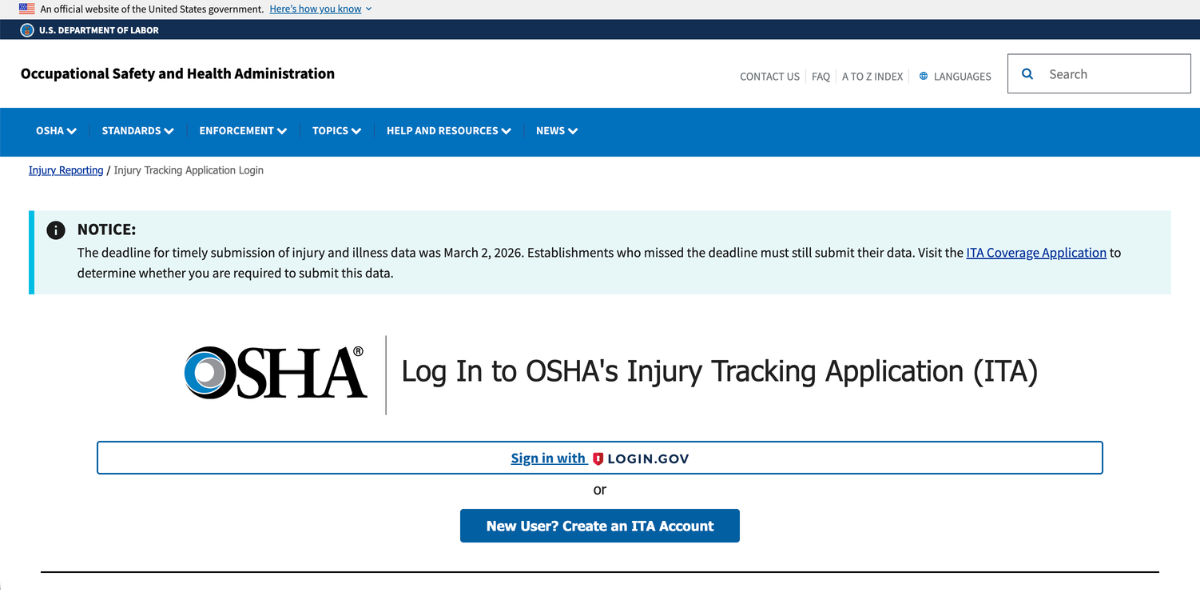
Each account is tied to specific establishments. If your organization has multiple locations that are all required to submit, each establishment needs to be set up separately within the ITA system.
Step 2: Verify Your Establishment Information
Before entering any data, confirm that your establishment's information is accurate and current: legal name, doing-business-as name if applicable, physical address, NAICS code, and ownership type. Your NAICS code is particularly important - it determines whether your submission triggers any industry-specific benchmarking or targeting analysis on OSHA's end.
If your NAICS code has changed since your last submission, due to a change in primary business activity, a reclassification, or a corporate restructuring, update it before submitting. Submitting under an incorrect NAICS code produces inaccurate rate comparisons and can create compliance issues down the line.
Step 3: Enter Your 300A Summary Data
The ITA will prompt you to enter the summary totals from your certified OSHA 300A. This includes:
- Total number of deaths
- Total cases with days away from work
- Total cases with job transfer or restriction
- Total other recordable cases
- Total days away from work
- Total days of job transfer or restriction
- Total cases by injury/illness type (injuries, skin disorders, respiratory conditions, poisonings, hearing loss, all other illnesses)
- Annual average number of employees
- Total hours worked by all employees during the calendar year
The hours worked and average employee count figures are used by OSHA to calculate your Total Recordable Incident Rate (TRIR) and Days Away, Restricted, or Transferred (DART) rate — the two primary safety metrics used for industry benchmarking and inspection targeting. Pull these numbers from your payroll records. Estimating or rounding significantly can distort your rates in ways that either understate a genuine safety problem or unfairly flag your establishment for scrutiny.
Step 4: Review and Submit
Before hitting submit, review every field against your certified 300A. A typo in the hours worked field, for example, can dramatically skew your calculated injury rates. Once you're confident the data is accurate, submit and save your confirmation number and a screenshot of the submission confirmation page. This is your proof of timely submission if it's ever questioned.
Step 5: Amend if Necessary
If you discover an error after submitting, the ITA allows amended submissions. Log back into the system, locate your submission, and make the correction. Document what was changed and why. If the amendment changes your injury rates materially, note that in your internal records as well.
How OSHA Uses Your ITA Data
Understanding what happens to your data after you submit it is essential for EHS teams that want to manage their organization's safety profile strategically.
Site-Specific Targeting (SST) Inspections
OSHA's SST program uses ITA data to generate lists of establishments with injury and illness rates above industry benchmarks. Establishments on those lists become candidates for programmed inspections — OSHA shows up not because of a reported incident or a complaint, but because your numbers put you in the crosshairs. For EHS managers, this is one of the most compelling arguments for taking injury prevention seriously beyond just compliance: lower rates mean less inspection exposure.
Public Data Disclosure
OSHA publishes establishment-level ITA data on its website after removing personally identifiable information. This means your organization's injury rates are visible to anyone who looks — insurers, general contractors evaluating subcontractors, clients conducting vendor due diligence, and job seekers researching potential employers. In industries where safety performance is part of prequalification requirements, your ITA data can directly affect your ability to win contracts.
National Safety Research and Rulemaking
The aggregated ITA dataset is one of the largest real-time collections of workplace injury data in the world. OSHA and NIOSH researchers use it to identify emerging injury trends, assess the effectiveness of safety standards, and inform future rulemaking. When you submit accurate data, you're contributing to a system designed to make workplaces safer industry-wide — not just your own.
Common ITA Mistakes EHS Teams Make
Submitting under the wrong NAICS code. This is more common than it sounds, especially after corporate restructurings or acquisitions. Verify your NAICS code annually.
Using estimated hours worked. Your TRIR and DART rates are only as accurate as your hours worked figure. Pull the actual number from payroll — don't estimate.
Missing the March 2 deadline. There's no grace period. Calendar it well in advance and build a two-week buffer for data verification.
Not saving submission confirmation. The ITA doesn't send a confirmation email by default. Screenshot your confirmation page and store it with your annual recordkeeping documents.
Submitting 300A data that doesn't match your posted 300A. OSHA can and does compare submitted data against posted summaries during inspections. Discrepancies create immediate credibility problems.
Forgetting multi-site establishments. If your organization has multiple locations, each one above the size threshold must submit independently. A centralized EHS team managing multiple sites needs a systematic process to ensure no establishment is missed.
Not verifying submission requirements annually. Establishment size changes. Industry classifications shift. Regulatory thresholds get updated. Don't assume last year's determination about whether you're required to submit still applies this year.
ITA Best Practices for EHS Teams
Build the ITA into your annual EHS calendar as a hard deadline, not an afterthought. March 2 should be on your radar in January, not February 28.
Designate a primary and backup ITA account holder. If the one person who knows the login credentials leaves the organization, you have a problem. Document your ITA account access in your EHS program documentation.
Reconcile your 300A totals against your 300 Log before submitting. Count the entries on your 300 Log manually and compare them to your 300A totals. Errors in the summary almost always originate from errors in the log.
Track your TRIR and DART rates internally throughout the year. Don't wait until submission time to discover your rates are trending significantly above your industry benchmark. Monthly or quarterly rate calculations give you time to investigate root causes and course-correct.
Use a safety management platform that integrates with your recordkeeping. Manual data transfer from a 300 Log spreadsheet to the ITA is a recipe for transcription errors. A platform like SafetyIQ that maintains your incident data and generates OSHA-compliant summaries reduces the risk of data entry mistakes and makes the annual submission process significantly faster.
Frequently Asked Questions About the ITA
What if I have zero recordable incidents — do I still need to submit?
Yes. If your establishment meets the size and industry thresholds, you must submit a 300A even if all your entries are zeros. A zero-incident year is still a required submission.
Can I submit on behalf of multiple establishments in one login session?
Yes. The ITA allows a single account to manage multiple establishments. You'll need to set up each establishment separately, but you can move between them within one login session.
What happens if I miss the March 2 deadline?
Submit as soon as possible. Late submission doesn't eliminate the violation, but submitting promptly and documenting the circumstances is better than not submitting at all. If OSHA identifies the late submission during an inspection, having a record of eventual submission and an explanation is more favorable than having no submission on file.
Is my submitted data really public?
Yes. OSHA publishes establishment-level data with personally identifiable employee information removed. Your organization's name, location, industry, and injury rates can be looked up by anyone.
The Bottom Line for EHS Teams
EHS professionals who treat the ITA as a strategic tool rather than an annual chore are in a fundamentally better position: they know their rates, they understand their benchmarks, and they're not blindsided by inspection letters in the spring. Get your data right, submit on time, and use what the ITA tells you to build a safer workplace; because that's what the system was designed to do in the first place.
SafetyIQ brings incidents, inspections, training, journey management, lone worker safety and fatigue into one mobile app. Tell us about your crews and sites for tailored pricing.
Safety insights, straight to your inbox
New guides, monthly safety topics and SafetyIQ updates for EHS and operations leaders. Unsubscribe anytime.



Get a demo built around your sites, your teams, and the way your people work.
EHS, journey, and fatigue management software for field-heavy teams.

.png)

.png)