
OSHA 300, 300A & 301 Forms: The Complete Recordkeeping Guide
Confused by OSHA 300, 300A & 301 forms? This complete recordkeeping guide breaks down who needs them, how to complete them, and the mistakes that trigger inspections.
If OSHA recordkeeping makes your head spin, you're not alone. The 300 Log, 300A Summary, and 301 Incident Report trip up employers every year, and the penalties for getting it wrong aren't cheap. Miss a posting deadline, miscategorize a case, or skip a form entirely, and you're looking at citations that can run into the thousands per violation. This guide breaks down all three forms in depth: who needs them, how to complete them correctly, what triggers a recordable case, and the mistakes safety managers and HR teams make that put their companies squarely on OSHA's radar.
What Are OSHA Forms 300, 300A, and 301?
These three forms are the backbone of OSHA's injury and illness recordkeeping system, established under the Occupational Safety and Health Act of 1970. They're designed to work as a set - the 300 feeds the 300A, and every entry on the 300 should have a corresponding 301 behind it. Miss one piece, and your compliance picture has a gap an inspector will notice.
OSHA Form 300: The Log of Work-Related Injuries and Illnesses
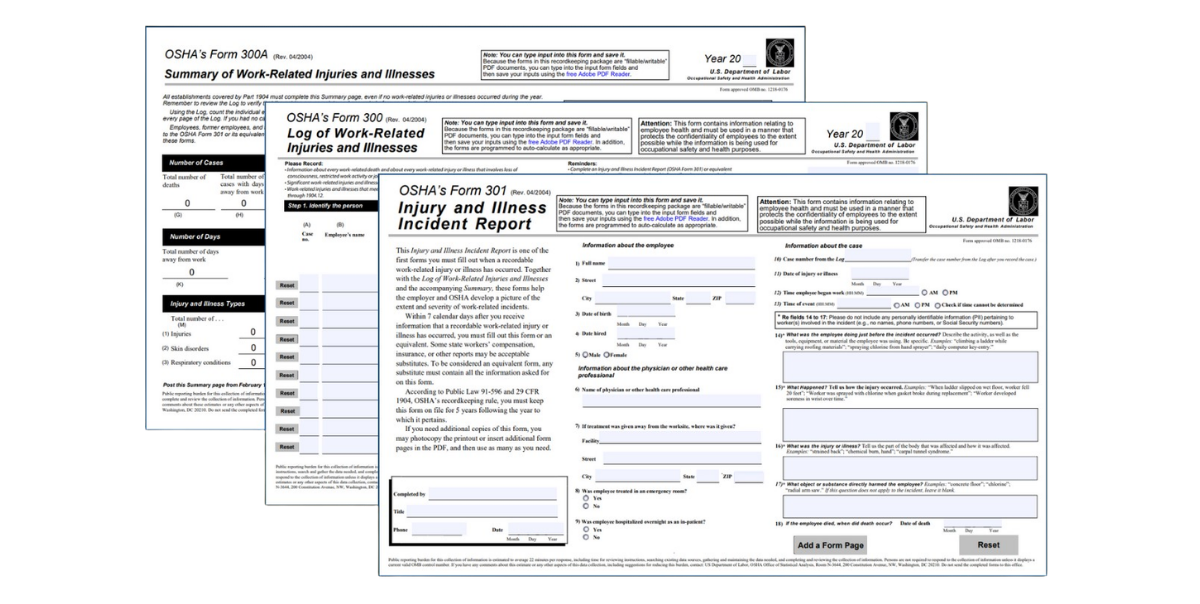
The 300 Log is your master record, a running document updated throughout the calendar year every time a qualifying workplace incident occurs. Each recordable case gets its own line, and that line captures the who, what, where, and how serious at a glance. Think of it as your incident ledger for the year.
The 300 Log must be updated within seven calendar days of learning that a recordable incident has occurred. It stays active all year and is the source data for your 300A Summary at year-end. Employers must keep the 300 Log accessible to employees, former employees, and their representatives, and must be able to produce it for OSHA within four business hours of a request during an inspection.
What makes the 300 Log particularly valuable beyond compliance is its utility as a safety management tool. When reviewed regularly — monthly or quarterly — it reveals patterns: Are injuries clustering around a particular shift, department, or task? Are certain body parts being injured repeatedly? That kind of trend data is what separates reactive safety programs from proactive ones.
OSHA Form 300A: The Annual Summary
The 300A is a year-end snapshot that aggregates the totals from your 300 Log into a single summary document. It's not just a filing requirement — it's a public-facing accountability document that your workforce has a legal right to see.
Once your 300A is completed, it must be certified by a qualifying company executive — an owner, corporate officer, or the highest-ranking official working at the establishment. This certification isn't a formality. It's a legal attestation that the information is accurate and complete to the best of that person's knowledge. Falsifying or knowingly certifying inaccurate records can result in criminal liability under the OSH Act.
After certification, the 300A must be posted in a prominent, accessible location — a break room, a main hallway, wherever employees are likely to see it, from February 1 through April 30 every year. This posting requirement applies even if your establishment had zero recordable incidents during the previous year. A blank 300A still needs to go up.
For establishments that meet the size and industry thresholds, the 300A data must also be submitted electronically through OSHA's Injury Tracking Application (ITA) by March 2 each year. We'll cover who's required to submit electronically in detail below.
OSHA Form 301: The Injury and Illness Incident Report
If the 300 Log is the headline, the 301 Incident Report is the full story. A separate 301 must be completed for every case recorded on the 300 Log, and it must be completed within seven calendar days of learning about the recordable incident - the same window as the 300 Log entry.
The 301 captures information that simply doesn't fit on the 300 Log's single-line format: the employee's regular job duties, their work schedule, what they were doing at the moment of the incident, the sequence of events that led to the injury, the specific object or substance involved, the part of the body affected in detail, and the name and contact information of the treating physician or facility.
This level of detail matters for several reasons. It supports workers' compensation claims, informs future hazard assessments, and gives OSHA a complete picture of how an incident occurred - which is critical during an inspection or investigation. The 301 is also the document most likely to be requested by an injured employee or their legal representative.
One important note: employers may use an equivalent substitute for the 301 as long as it captures all the same information. Many companies use their state workers' compensation first report of injury form for this purpose. If your workers' comp form covers everything the 301 asks for, you don't need to fill out a separate OSHA form — just make sure the documents are stored together and linked by the case number on the 300 Log.
Who Is Required to Maintain OSHA 300, 300A, and 301 Records?
Covered Employers
Most private-sector employers with 11 or more employees at any point during the previous calendar year are required to maintain all three OSHA recordkeeping forms. This covers the vast majority of manufacturing, construction, healthcare, transportation, and warehouse operations. State and local government employers are covered under OSHA-approved state plans. Federal agencies operate under separate recordkeeping rules administered by each agency.
The coverage determination is based on the total number of employees across all locations, not just at a single establishment. An employer with eight employees at one site and five at another (thirteen total) is covered even if neither individual location hits eleven on its own.
Small Employer Exemption
Employers with 10 or fewer employees throughout the entire previous calendar year are exempt from routine OSHA recordkeeping. They do not need to maintain a 300 Log, 300A, or 301 for routine incidents. However, this exemption does not apply to severe injury reporting - any work-related fatality must be reported to OSHA within eight hours, and any in-patient hospitalization, amputation, or eye loss must be reported within 24 hours, regardless of company size.
Partially Exempt Industries
OSHA has designated certain low-hazard industries as partially exempt from the 300, 300A, and 301 recordkeeping requirements based on their NAICS code. These include many retail trade, finance, insurance, real estate, and personal services industries. Employers in partially exempt industries still need to comply with all other OSHA standards; they just don't have to maintain the routine injury logs.
Not sure whether your industry is partially exempt? OSHA publishes the full list of exempt NAICS codes on its website. If your code is on the list, you're exempt from routine recordkeeping but never from severe injury reporting. When in doubt, consult a safety compliance professional before deciding you're off the hook.
What Makes a Case Recordable on the OSHA 300 Log?
This is where most recordkeeping errors originate. Understanding the recordable case criteria is the single most important skill in OSHA 300 compliance.
A case must be recorded on the 300 Log if it meets all three of the following conditions:
- It is work-related
- It is a new case (not a continuation of a previously recorded case)
- It meets at least one of OSHA's recording criteria
Recording Criteria
A work-related, new case is recordable if it results in any of the following:
- Death
- Days away from work (one or more calendar days, not counting the day of the incident)
- Restricted work activity or job transfer (the employee cannot perform all their routine job functions)
- Medical treatment beyond first aid
- Loss of consciousness, regardless of duration
- A significant diagnosis by a licensed healthcare professional — for example, a fracture, a torn ligament, or a significant injury even if it doesn't require extensive treatment
- A special-category condition such as a needlestick or sharps injury involving potentially infectious material, a work-related case of tuberculosis, a work-related hearing loss diagnosis, or a musculoskeletal disorder that meets OSHA's specific criteria
First Aid vs. Medical Treatment: The Most Common Confusion
OSHA's definition of first aid is a specific, published list — not a judgment call about how serious the injury looks. If a treatment appears on OSHA's first aid list, it's not recordable based on that treatment alone. If it doesn't appear on the list, it's medical treatment and the case is likely recordable.
First aid includes things like: cleaning, flushing, or soaking wounds; applying bandages, butterfly closures, or Steri-Strips; using non-prescription medications at non-prescription strength; applying hot or cold therapy; drilling a fingernail to relieve pressure; and using non-rigid means of support like elastic bandages.
Medical treatment includes: prescription medications, sutures, staples, wound closure strips used in place of sutures, physical therapy, chiropractic treatment after the first visit, and any treatment that goes beyond what's on the first aid list. The key phrase is "beyond first aid" — if the treatment exceeds what a layperson could reasonably provide with a well-stocked first aid kit, it's almost certainly recordable.
Work-Relatedness
A case is work-related if an event or exposure in the work environment caused or significantly contributed to the condition, or significantly aggravated a pre-existing condition. The work environment includes anywhere an employee is performing work for the employer — a fixed worksite, a customer's location, a vehicle used for work, or in many cases a home office.
There are specific exceptions to work-relatedness: injuries that occur during personal tasks at work, injuries from eating or drinking food the employer didn't provide, injuries caused by personal grooming or self-medication, and injuries that result from a natural disaster affecting the general public, among others.
How to Complete OSHA Forms 300, 300A, and 301
Filling Out the OSHA 300 Log
Columns A through F — Case and Employee Information
- Column A (Case Number): Assign a unique sequential number to each case. This number is the link between your 300 Log entry and the corresponding 301 Incident Report — don't skip or reuse numbers.
- Column B (Employee Name): Enter the full name of the injured or ill employee. For privacy cases (see below), enter "Privacy Case" — never leave this field blank.
- Column C (Job Title): The employee's regular job title, not what they were doing when the incident occurred.
- Column D (Date of Injury or Illness): The date the injury happened or, for occupational illnesses, the date the diagnosis was made or the condition was recognized.
- Column E (Location): A specific physical description of where the event occurred — building, department, floor, or area. "Warehouse" is acceptable; "facility" is too vague.
- Column F (Description): A brief but specific description of the injury and affected body part. "Laceration, right index finger" or "Lower back strain from lifting" — specific enough that someone reading it later understands what happened without referencing the 301.
Columns G through J — Case Classification
Check exactly one box per case to indicate the most serious outcome:
- Column G: Death
- Column H: Days away from work
- Column I: Job transfer or restriction
- Column J: Other recordable case (medical treatment, loss of consciousness, significant diagnosis)
If a case involves both days away from work and subsequent restricted duty, check Column H (days away) — always check the most severe outcome.
Columns K and L — Day Counts
- Column K: Total calendar days the employee was away from work, not counting the day of the incident. If still out at year-end, enter an estimate and update when resolved. Cap at 180 days.
- Column L: Total calendar days of restricted work or job transfer, not counting the day of the incident. Same 180-day cap applies.
Columns M1 through M6 — Injury and Illness Type
Check one classification: injury, skin disorder, respiratory condition, poisoning, hearing loss, or all other illnesses. When an incident involves both an injury and an illness (rare but possible), classify it as an injury.
Filling Out the OSHA 300A Summary
At year-end, add up each column on your 300 Log and transfer the totals to the corresponding fields on the 300A. The form also requires your establishment's total hours worked by all employees during the year and your average number of employees — data you'll pull from payroll records.
Once the numbers are entered, a qualifying executive must review and sign the certification statement. After that, post it and — if required — submit it electronically by March 2.
Filling Out the OSHA 301 Incident Report
Complete one 301 within seven days of each recordable incident. The form is divided into three sections:
Employee Information: Name, address, date of birth, date hired, gender, and whether the employee is a regular part-time or seasonal worker.
Physician and Treatment Information: Name and address of the treating physician or facility, whether the employee was treated in an emergency room, whether they were hospitalized overnight.
Incident Description: What was the employee doing just before the incident? What happened? What object or substance directly caused the harm? What body part was affected? If it was an illness rather than an injury, how long had the employee been doing the work that caused the condition?
The 301 narrative fields should be specific and factual — not a legal brief, but detailed enough that someone reading it a year later can reconstruct exactly what happened without needing to interview witnesses again.
Privacy Cases: Protecting Sensitive Employee Information
Certain types of injuries and illnesses involve information sensitive enough that OSHA requires special handling on the 300 Log.
Cases that qualify as privacy cases include:
- Injuries or illnesses to an intimate body part or the reproductive system
- Injuries or illnesses resulting from sexual assault
- Mental illness
- HIV infection, hepatitis, or tuberculosis
- Needlestick or sharps injuries contaminated with another person's blood or infectious material
- Any other illness where the employee requests privacy and the employer agrees it's appropriate
For privacy cases, enter "Privacy Case" in Column B instead of the employee's name. Maintain a separate, confidential log that matches case numbers to employee names — this list is available to OSHA upon request but is not shared with other employees or representatives.
Electronic Submission Requirements for the OSHA 300A
Not every employer needs to submit data electronically, but the thresholds are lower than many people realize.
Required to submit 300A data electronically each year:
- Establishments with 250 or more employees in industries covered by OSHA recordkeeping
- Establishments with 20 to 249 employees in designated high-hazard industries (construction, manufacturing, healthcare, agriculture, and others listed by NAICS code)
Deadline: March 2 each year for the prior calendar year's data, submitted through OSHA's Injury Tracking Application.
Failing to submit electronically when required is a recordkeeping violation. If your establishment size or industry changes year to year, verify your submission requirements annually rather than assuming last year's determination still applies.
Common OSHA 300, 300A & 301 Recordkeeping Mistakes
Recording too late. Seven calendar days is the window for both the 300 Log entry and the 301. Supervisors who sit on incident reports - waiting to "see how it develops" - routinely cause this violation. Build a workflow where any incident requiring medical attention beyond first aid automatically triggers the recordkeeping clock.
Misclassifying medical treatment as first aid. This is the most common substantive error. Review OSHA's first aid list any time you're uncertain. When in doubt, record the case. You can always remove it later with documentation if you determine it wasn't recordable.
Ignoring aggravated pre-existing conditions. Many employers incorrectly assume that a prior injury or condition makes a new incident non-recordable. Under OSHA rules, if the work environment significantly worsened a pre-existing condition, the case is work-related and likely recordable.
Freezing day counts. If a case is still active at year-end, you must enter an estimate of the days and update the log when it resolves. Leaving a case open with no day count is an audit flag.
Missing the 300A posting window. February 1 to April 30, every year, without exception. Put it in your safety calendar with a two-week lead reminder.
Not linking the 300 and 301. Every line on your 300 Log should have a 301 on file with the matching case number. Missing 301s are one of the first things OSHA checks during an inspection.
Frequently Asked Questions: OSHA 300, 300A & 301 Recordkeeping
How long do I need to keep OSHA 300, 300A, and 301 records?
All three forms must be retained for five years following the end of the calendar year they cover. Records from 2024 must stay on file through the end of 2029. This isn't a suggestion - it's a federal requirement, and failing to produce records upon a legitimate OSHA request is itself a citable violation, separate from any underlying recordkeeping issues.
During the five-year retention period, current and former employees have the right to access the 300 Log for any establishment where they worked. Responses to employee requests must generally be provided by the end of the next business day. Employee representatives and union officials also have access rights. Privacy case names are protected throughout, but all other data on the log is accessible.
OSHA compliance officers can request all three forms during an inspection, and they're entitled to records going back five years. This means your recordkeeping quality today affects your compliance exposure for the next five years. Organized, retrievable, accurate records are your best protection — whether that means a well-maintained filing system or a digital safety management platform.
Does every work-related injury need to go on the OSHA 300 Log?
No — and this distinction is critical. Only recordable cases go on the 300 Log. A case that required nothing beyond first aid does not belong there, even if it was clearly work-related and even if the employee filed a workers' comp claim.
That said, under-recording is just as problematic as failing to record. OSHA inspectors are trained to identify patterns that suggest systematic under-recording — a facility with hundreds of employees and only two or three 300 Log entries a year, for example, is going to draw scrutiny. If you decide a case isn't recordable, document your reasoning. Write down what treatment was provided, why it qualified as first aid, and who made the determination. That paper trail is your defense if the decision is ever questioned.
Over-recording — putting cases on the log that don't meet the criteria — is generally not a violation, but it does inflate your injury rates, which can have implications for insurance premiums, contract bids, and OSHA's targeting algorithms for inspections. Accuracy in both directions matters.
What's the difference between the OSHA 300 Log and the OSHA 301 Incident Report, and do I really need both?
Yes, you need both, and they serve fundamentally different purposes. The 300 Log is a summary document, a one-line-per-case ledger designed for trend tracking and workforce-level analysis. The 301 Incident Report is a detailed narrative form that captures the full context of each individual incident.
Think of it this way: if OSHA asks "how many musculoskeletal injuries did your warehouse have last year?" the answer comes from the 300 Log. If they ask "walk me through exactly what happened to the employee who injured their back on March 14th," the answer comes from the 301.
Both forms are required for every recordable case. The case number in Column A of the 300 Log is what links the two documents, without that linkage, your records are incomplete and disorganized. If you're using your state workers' comp first report of injury in place of the OSHA 301, verify annually that the workers' comp form still captures all the information the 301 requires, since state forms occasionally change.
Can I correct mistakes on the OSHA 300, 300A, or 301?
Not only can you — you should, and promptly. OSHA expects records to be accurate and updated as new information becomes available. Leaving a known error uncorrected is worse than the original mistake.
For minor corrections on the 300 Log, draw a single line through the incorrect entry and write in the correct information. Annotate with a date and your initials. For more significant changes — removing a case that turned out not to be recordable, or adding a case that was missed — make the change and attach a brief written explanation of why. Keep that explanation with the record for the full five-year retention period.
If you're correcting the 300A after it's already been posted or submitted electronically, post an amended version and resubmit to the ITA if the submission deadline has passed. OSHA's ITA system allows amended submissions.
The scenario that requires the most care is discovering a systemic error — an entire category of cases has been misclassified for months or years. Before making broad corrections in that situation, consult a safety compliance attorney or a qualified safety consultant. Sweeping unexplained changes to historical records, especially if an inspection is possible, can raise more questions than they answer.
Do OSHA 300, 300A, and 301 recordkeeping requirements apply to remote and work-from-home employees?
Yes, in many circumstances, and this is an area where a lot of employers with hybrid or fully remote workforces are unknowingly out of compliance.
OSHA's position is that a remote employee's designated home workspace is part of their work environment. If an injury occurs in that space during the performance of a work task, it is potentially work-related and recordable under the same criteria as any other incident.
The practical test is always: was the employee performing a work task when the injury occurred? If an employee is on a work video call and their monitor falls and hits them, that's likely work-related. If the same employee trips over a laundry basket while walking to their kitchen for a personal break, that's not work-related — even though it happened at home during work hours.
OSHA has made clear that employers are not expected to conduct home office inspections, and they are not responsible for hazards in the home that are unrelated to work. But when a remote employee reports an injury that occurred during work hours, employers need to apply the same work-relatedness analysis they'd apply to any other incident — gather the facts, document the investigation, and make a reasoned determination. That documentation goes into the 301 if the case is recordable, and onto the 300 Log just like any other case.
As remote work becomes a permanent fixture for many workforces, building a clear written policy for reporting and investigating home-based incidents is no longer optional — it's a necessary part of a complete OSHA recordkeeping program.
Simplify OSHA 300, 300A & 301 Recordkeeping
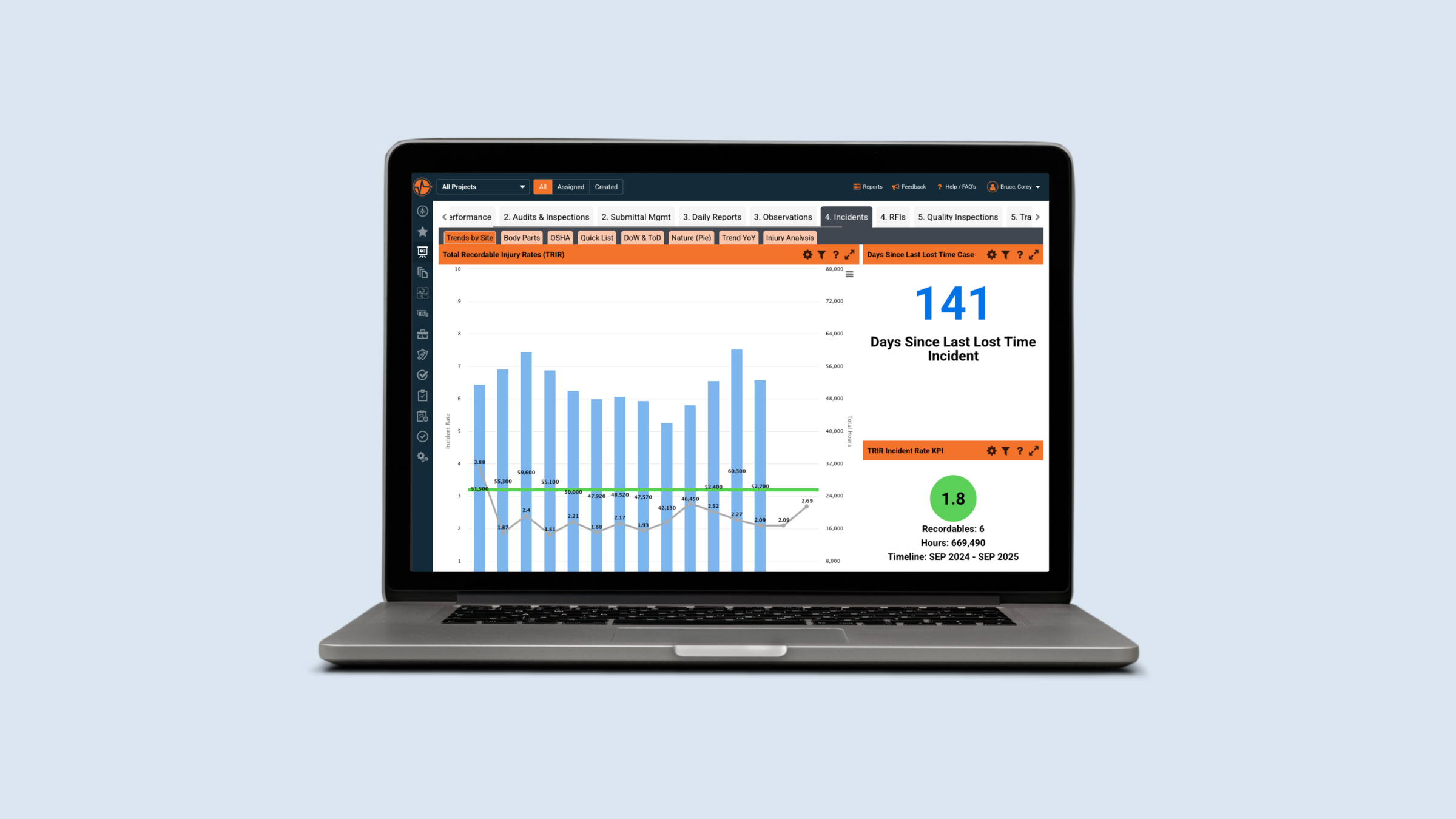
Managing all three OSHA forms across spreadsheets, paper logs, and email threads is a compliance risk disguised as a workflow. SafetyIQ centralizes your entire recordkeeping process: capturing safety incident data in real time, automatically flagging recordable cases, generating OSHA 300, 300A, and 301 forms on demand, and sending automated reminders for posting deadlines and electronic submission windows.
Less manual work. Fewer gaps. A cleaner audit trail, and more time focused on what actually matters: keeping your people safe.
SafetyIQ brings incidents, inspections, training, journey management, lone worker safety and fatigue into one mobile app. Tell us about your crews and sites for tailored pricing.
Safety insights, straight to your inbox
New guides, monthly safety topics and SafetyIQ updates for EHS and operations leaders. Unsubscribe anytime.

Get a demo built around your sites, your teams, and the way your people work.
EHS, journey, and fatigue management software for field-heavy teams.

.png)

.png)